Home »
How to Turn Off Ad Blocker: Chrome, Firefox, Safari, Edge & Mobile (2026)
You load a page, and boom! There's a pop-up message that insists that you turn off your ad blocker :) Maybe you want to support your favorite publisher, maybe stream a new video, or maybe finish a checkout that breaks when you block scripts.
Whatever your goal is, more control over your browser comes when you learn how to turn off ad blocker extensions or pause them selectively.
You rarely need to uninstall your privacy extensions completely. In fact, you keep your online security intact while opening up the content you need when you learn how to allow ads on YouTube with ad blocker installed or pause adblock instead of disabling it entirely.
- Quick Answer: Turn Off Ad Blocker in 3 Steps (Chrome)
- Option A: Pause Ad Blocker for One Site Only (Recommended)
- Option B: Turn Off Ad Blocker Completely
- How to Turn Off Ad Blocker on Mobile
- How to Turn Off Ad Blocker on YouTube
- Why Does a Website Say I Have an Ad Blocker When I Don't?
- How to Re-Enable Your Ad Blocker After Turning It Off
- FAQs
Quick Answer: Turn Off Ad Blocker in 3 Steps (Chrome)
Follow these core steps if you run Google Chrome on a desktop and want to disable ad blocker tools right away:
- Look at the top-right corner of your browser bar and click the Extensions icon (it looks like a puzzle piece).
- Find your installed extension—such as Stands AdBlocker, uBlock Origin, or AdBlock Plus.
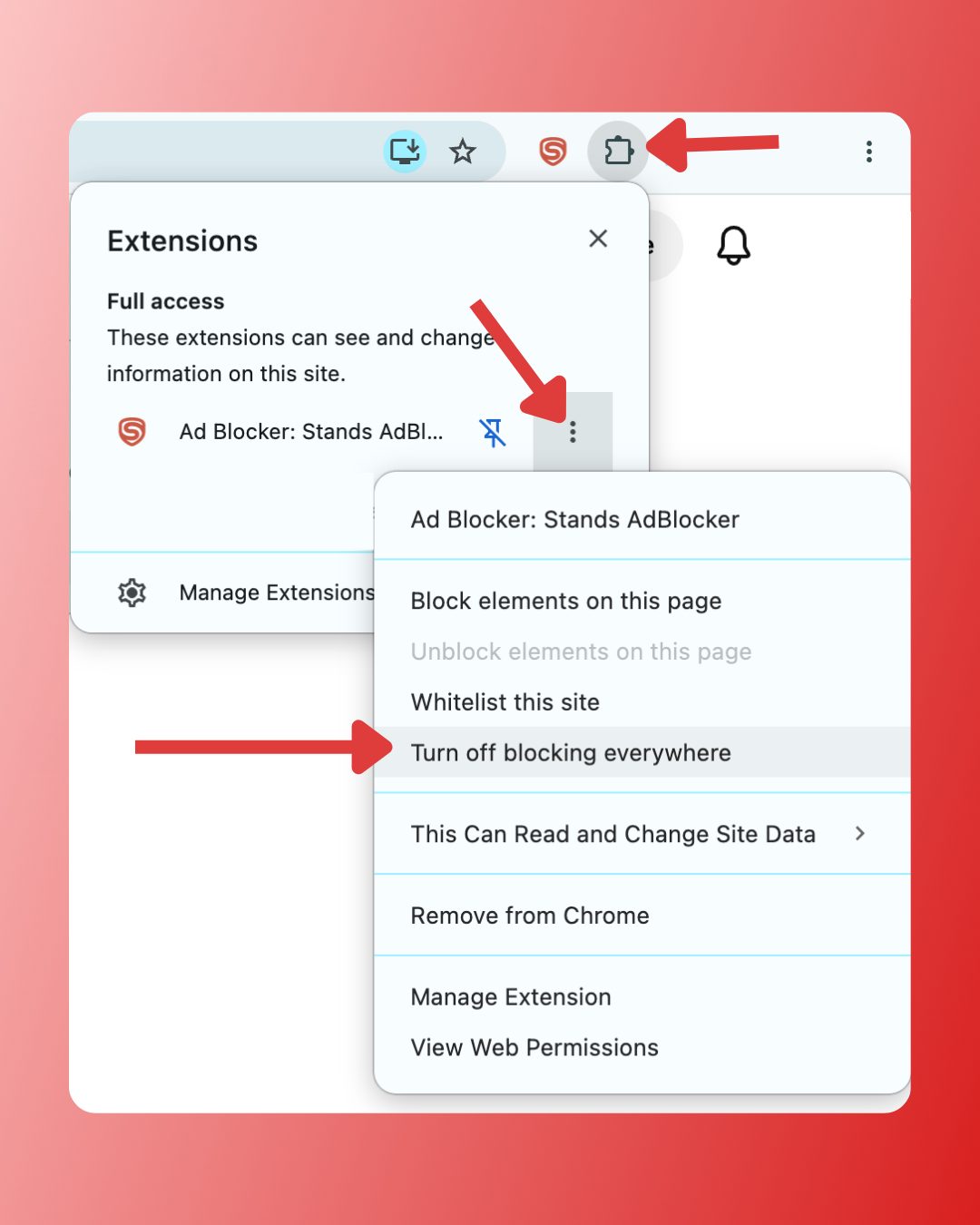
You probably pinned your extension directly to the toolbar if you don't see the puzzle piece. Click its icon right there and hit reload page to refresh your view.
Here is a quick breakdown across every major platform:
| Browser / Device | Quick Action | Menu Location | Whitelist Supported? |
| Chrome (Desktop) | Click Extensions icon (puzzle piece) | Top right toolbar | Yes (Click extension icon -> Pause/Toggle) |
| Firefox | Click Add-ons shield or extension icon | Top right address bar | Yes (Click shield or extension icon) |
| Safari (Mac) | Open Preferences/Settings | Safari > Settings > Extensions | Yes (Uncheck for site or globally) |
| Microsoft Edge | Click Extensions icon (puzzle piece) | Top right toolbar | Yes (Click extension icon -> Pause) |
| iPhone (Safari) | Open iOS System Settings | Settings > Safari > Extensions | Yes (Disable per site via 'aA' menu) |
| Android (Chrome) | Open Site Settings | Three dots > Settings > Site settings > Ads | Yes (Allow permissions for current site) |
Option A: Pause Ad Blocker for One Site Only (Recommended)
You leave your device open to intrusive pop-ups, malicious scripts, and heavy tracking networks when you turn off protection across all websites. But you make the smartest move when you turn off ad blocker for one website only! This strategy creates adblock exceptions while keeping your overall safety intact.
How to Whitelist a Site in Chrome (Stands / uBlock / AdBlock Plus)
You bypass site blockades without exposing yourself to annoying ads across the web when you learn how to whitelist a site in ad blocker tools.
- For Stands AdBlocker: Click the Stands shield in your browser bar. Select Disable for this site or toggle off protection.
- Add the domain directly inside your dashboard's adblock exceptions list to turn off Stands AdBlocker on specific site domains permanently.
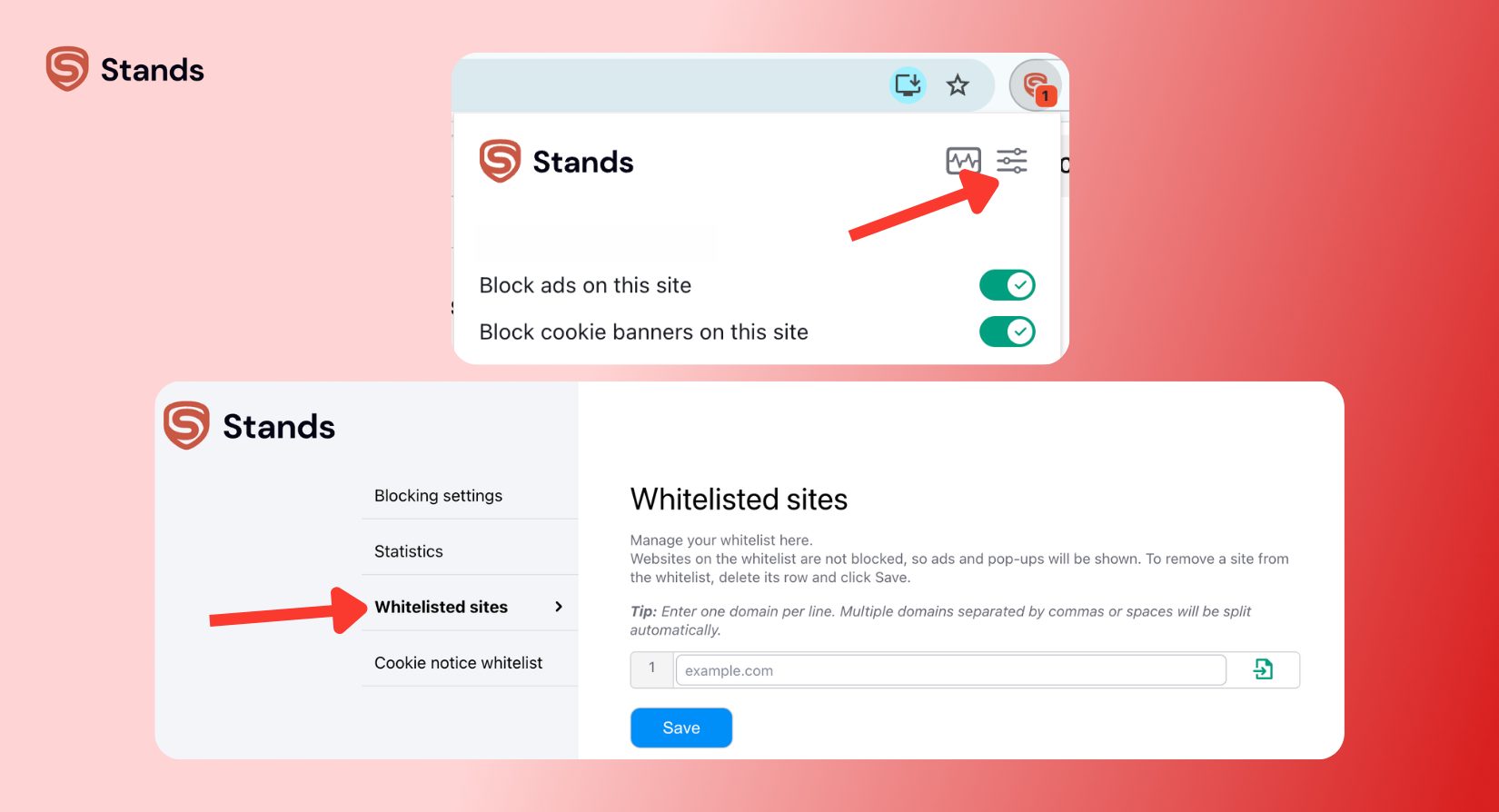
- For AdBlock Plus: Click the ABP icon. Toggle the switch next to This website from On to Off.
How to Pause Ad Blocker on YouTube Specifically
Video streaming sites use aggressive detection systems today. Pause ad blocker on specific site instances if you want to allow ads on site pages like YouTube without removing protection for the rest of your web browsing.
- Head over to YouTube.
- Select Pause on this site or toggle off the shield.
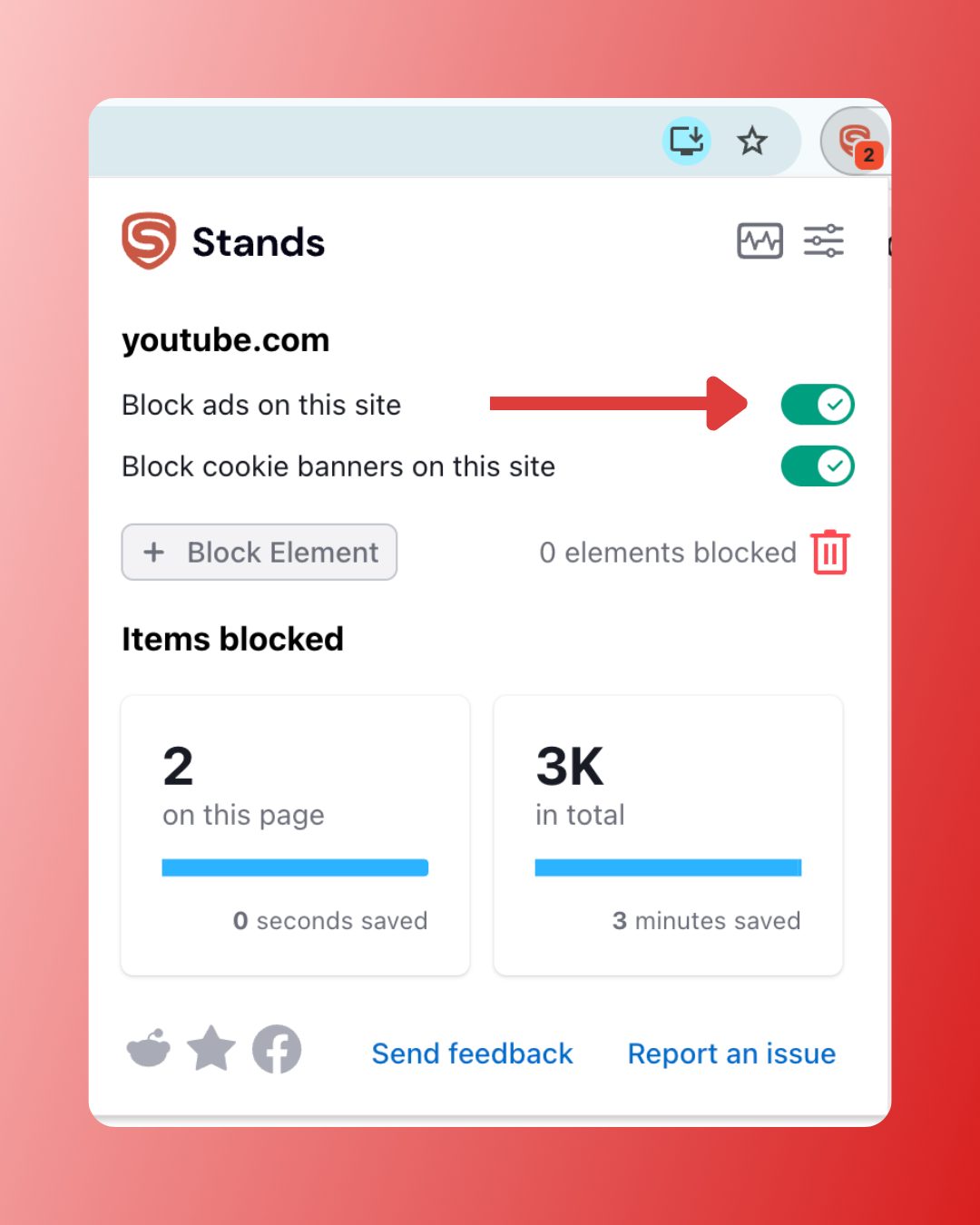
This action satisfies YouTube anti-adblock detection prompts while keeping your other tabs quiet, private, and ad-free :)
Option B: Turn Off Ad Blocker Completely
You might want to disable ad blocker extensions globally across your browser if pausing on individual domains doesn't resolve your issue.
How to Disable Ad Blocker in Chrome
To disable ad blocker tools completely in Google Chrome without deleting them:
- Click the three vertical dots in the top-right corner of Chrome.
- Hover over Extensions and select Manage Extensions.
- Locate your ad blocker (e.g., uBlock Origin or Stands).
- Flip the blue toggle switch to the left (Off position).
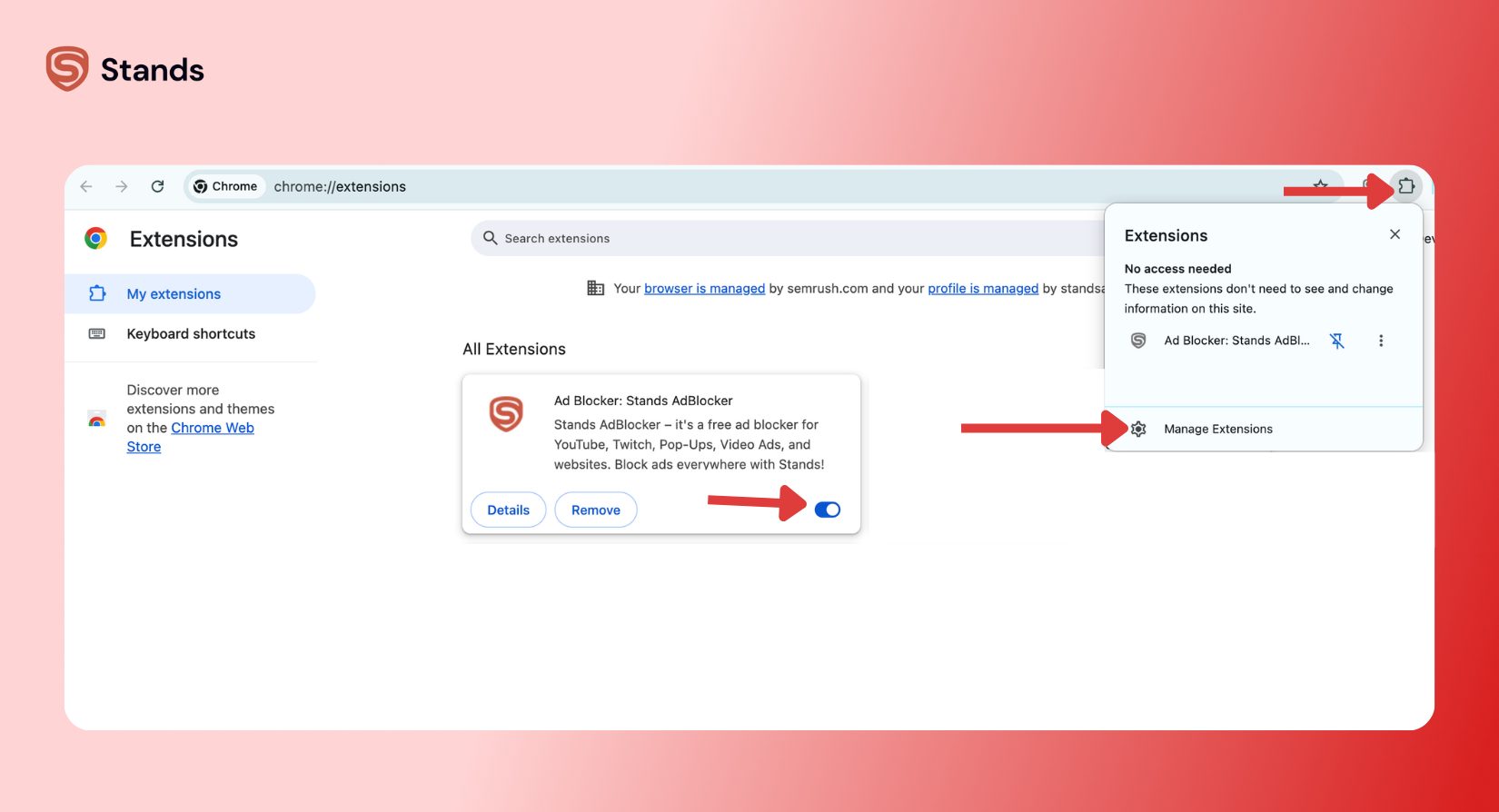
Chrome also packs a built-in filter. Type chrome://settings/content/ads into your address bar to manage this native layer. You can manage your individual site permissions under Allowed to show ads. Read our guide on how to turn on ad blocker in Chrome or consult the official Google Chrome Help documentation for deeper details on adjusting these settings.
How to Disable Ad Blocker in Firefox
You can manage your firefox add-ons with a quick sequence:
- Select Settings and go to Extensions and themes (or press Ctrl + Shift + A).
- Click Extensions in the left panel.
- Find your ad blocker and flip the blue toggle switch off :)
Firefox also runs built-in Enhanced Tracking Protection. Click the shield icon to the left of your URL bar and turn off the main switch to disable browser built-in ad blocker features for that active tab. Also, check the Mozilla Support Forum if your add-ons don't respond.
How to Turn Off Ad Blocker in Safari (Mac)
Safari relies on integrated macOS system controls to run safari content blockers:
- Select Settings (or Preferences), then click the Extensions tab.
- Uncheck the box next to your ad blocker extension on the left panel.
This step pauses filtering everywhere. Visit the Apple Support Community for extra Apple troubleshooting steps.
How to Disable Ad Blocker in Microsoft Edge
Managing edge extensions closely mirrors the Chromium steps:
- Click the puzzle piece icon or the three dots in the top right.
- Select Extensions > Manage Extensions.
- Toggle the active switch next to your ad blocker to the off position.
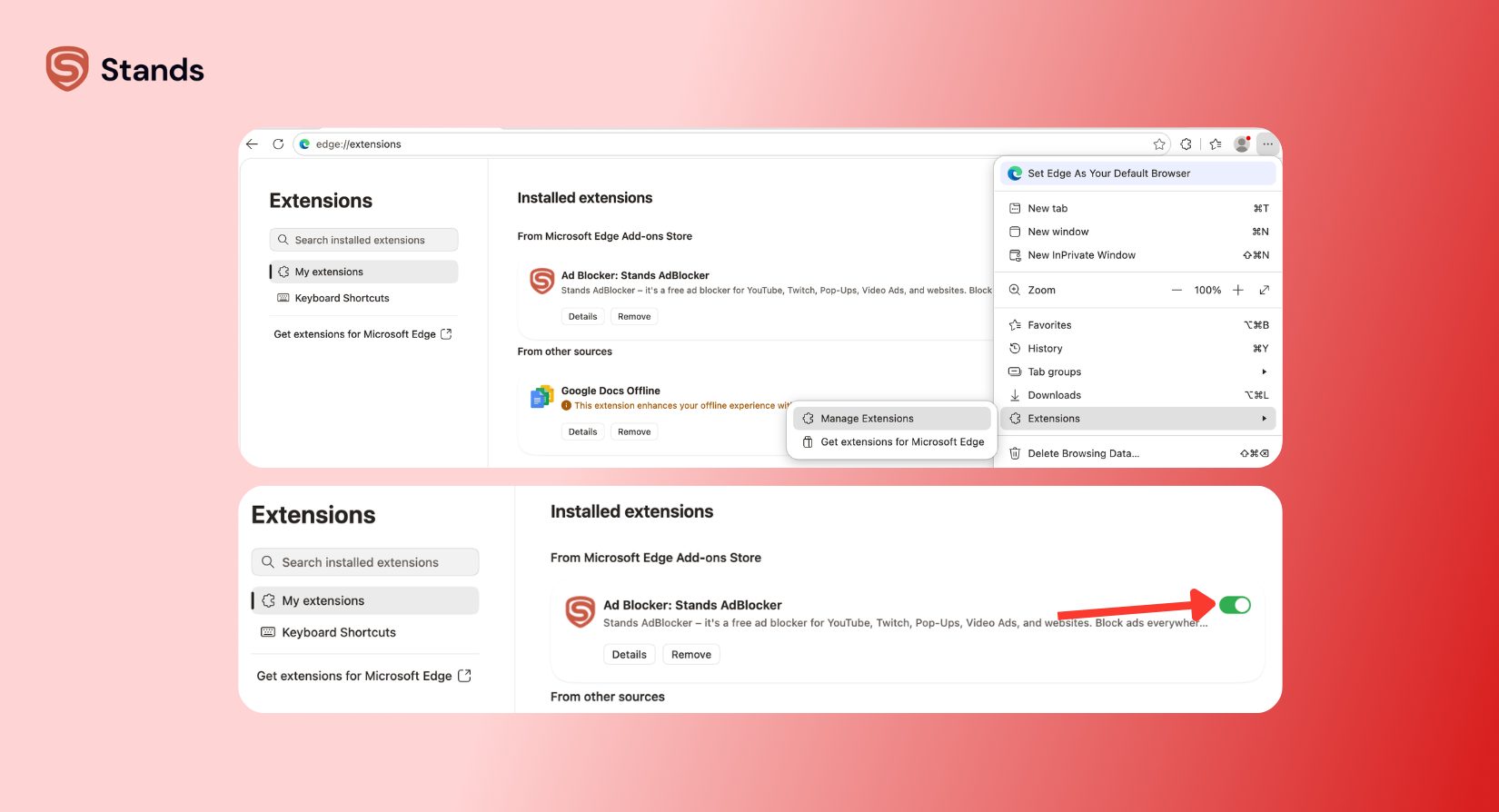
Edge also includes native Tracking Prevention. Head to edge://settings/privacy and switch the setting to Basic, or simply turn off protection for individual sites to adjust this feature. Read through Microsoft Learn Support for extra guidance.
How to Turn Off Ad Blocker on Mobile
Managing mobile filters requires a quick trip through your system settings rather than clicking simple browser toolbars.
Disable Ad Blocker on iPhone (Safari Content Blockers)
Follow these steps when you need to turn off adblock on iPhone safari setups:
- Open your iPhone Settings app.
- Scroll down and tap Safari.
- Tap Extensions.
- Select your content blocker app and toggle it Off :)
Tap the aA icon on the left side of your address bar and choose Turn Off Content Blockers if you want to allow ads on site domains temporarily while you browse in Safari.
Disable Ad Blocker on Android Chrome
Follow these steps to disable ad blocker chrome android native filters:
- Open the Chrome app on your Android device.
- Tap the three dots in the top right corner and choose Settings.
- Scroll down and tap Site settings.
- Tap Intrusive ads (or Ads) and toggle the switch to Allowed.
Also, learn how to set up the best ad blocker for Chrome Android so you can whitelist specific mobile apps if you rely on third-party system blockers on mobile.
How to Turn Off Ad Blocker on YouTube
Streaming platforms constantly update their adblock detection tools. Turning off your blocker or whitelisting the platform offers the easiest fix if YouTube shows you warnings.
- Open YouTube in your browser.
- Click your ad blocker extension icon.
- Select Pause on this site or add youtube.com to your whitelist.
- Reload the page :)
Check out our analysis of uBlock Origin vs uBlock Origin Lite to boost performance without hitting wall prompts if you experience script conflicts between lightweight and traditional blockers. Dive into our guide on YouTube anti-adblock – what to do for active workaround strategies.

Why Does a Website Say I Have an Ad Blocker When I Don't?
Nothing feels more annoying than a site blocking your access when you don't even run an extension! Here is why you face this problem and how you can fix it:
- Chrome Native Ad Blocker: Chrome automatically blocks ads on sites that break Coalition for Better Ads standards. Type chrome://settings/content/ads into your bar to turn off Chrome's native ad filter.
- DNS-Level Filtering: Services like NextDNS, Pi-hole, or privacy VPNs block requests at the network level. Turn off ad blocker features inside your VPN app.
- Strict Browser Tracking Protection: Features like Firefox Enhanced Tracking Protection or Brave Shields block scripts that websites misidentify as ad blockers.
Read our full guide to learn how you can bypass adblock detection safely if you bump into these paywalls often.
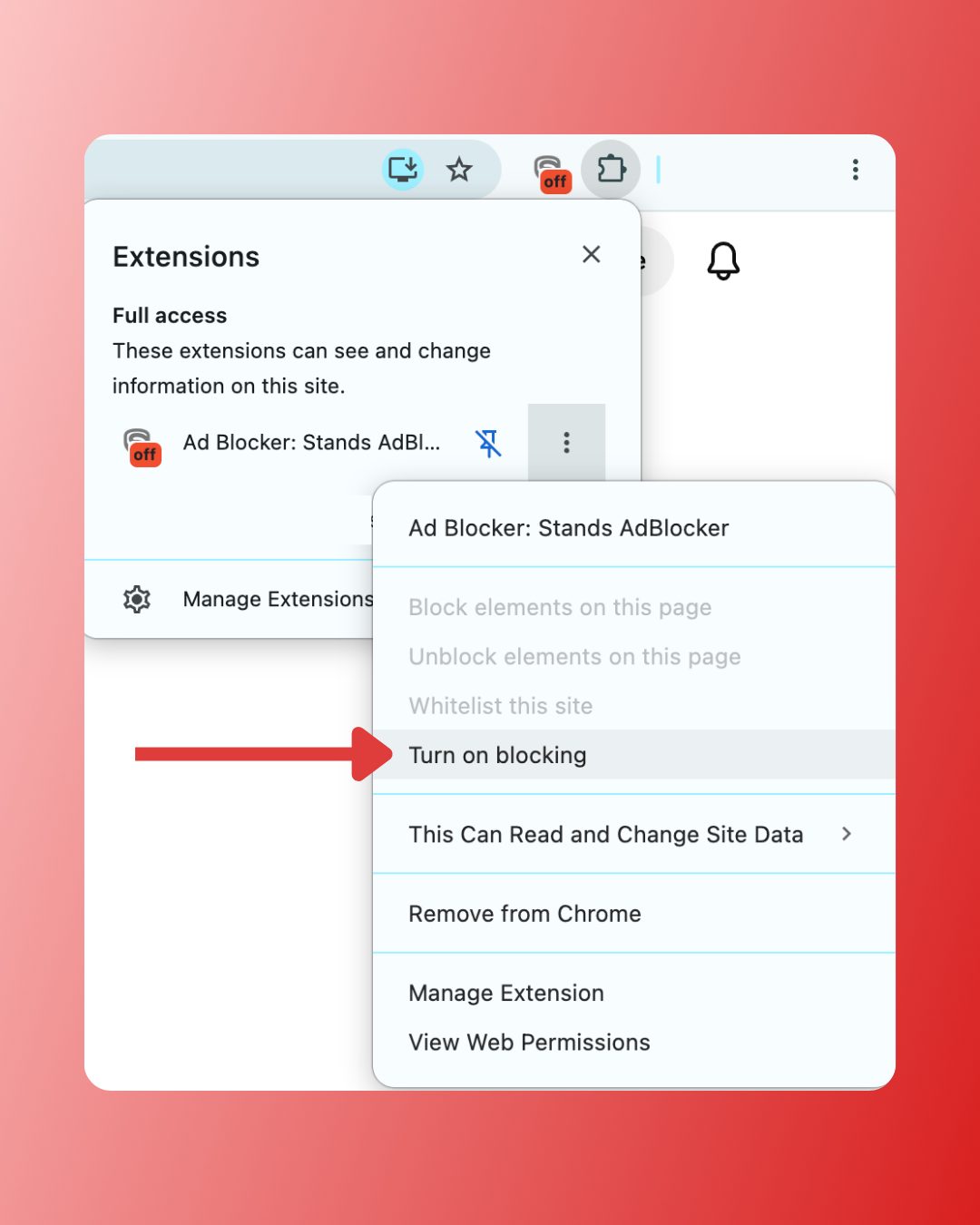
How to Re-Enable Your Ad Blocker After Turning It Off
You open yourself up to aggressive tracking and sneaky pop-ups when you leave ad filtering off permanently. Re-enabling your blocker takes only a second:
- Click your ad blocker icon.
- Reload your page to make sure your ad filtering active protection is running again :)
FAQs
How do I turn off ad blocker in Chrome?
Click the puzzle piece icon in your top right toolbar, select your ad blocker extension, and click its power icon or toggle switch off. You can also manage all installed extensions by typing chrome://extensions into your address bar.
How to turn off ad blocker on iPhone?
Open Settings > Safari > Extensions, select your content blocker, and toggle it off. Tap the aA icon in Safari's address bar and select Turn Off Content Blockers for quick site-specific disabling.
Can I turn off ad blocker for just one website?
Yes! Click your extension icon while you visit the target site and select Pause on this site or Disable for this site. This step adds the page to your whitelist while keeping active protection everywhere else :)
Why does YouTube say I have an ad blocker?
YouTube actively detects extensions that block its video ad scripts. Whitelist YouTube in your ad blocker settings or pause your blocker while you enjoy videos on the platform to clear the warning.
How to pause Stands AdBlocker on a specific site?
Click the Stands AdBlocker icon in your browser toolbar and click Disable for this site. The extension automatically creates an exception for that domain while continuing to protect you on every other website :)