Home »
How to Delete Instagram Account
Deleting an Instagram account can be a brilliant idea, whether it's for privacy reasons, having a digital break or simply because you want to start fresh! Instagram will allow two options:
- Temporarily deactivating or,
- Permanently deleting Instagram account, and both have different implications.
We will show you how to delete your Instagram account using phone or computer, and what you should consider before doing so. Permanently delete your Instagram account with easy steps.
- Understanding Instagram Account Delete Options
- How to Delete Instagram Accounts On Phone
- Learn How Do I Delete my Instagram Account Permanently on a PC or Mac
- Common Issues When Deleting Instagram Account
- How to Back Up Your Instagram Data Before Deleting Your Account
- How to Reactivate Your Instagram Account
- Why Choose Stands Adblocker for a Better Online Experience?
- FAQs About Deleting Instagram Account
Understanding Instagram Account Delete Options
Delete vs Deactivate: What is the Difference?
Deactivating will temporarily disable your Instagram account: All your photos, comments and profile won't be visible anymore, but will be automatically restored when you log back in. This is great if you want to take a break from Instagram without losing your data and connections.
On the other hand, if you delete Instagram permanently, you will delete all your information: posts, followers, messages or settings. You won't be able to recover anything after 30 days, and the username may become available to others.
What Happens When You Delete an Instagram Account?
Once you confirm the process, Instagram starts a progressive deletion process that lasts approximately 30 days. But how to cancel Instagram account deletion if you change your mind? Within this time, your account becomes inactive, but you can cancel its deletion if you want to :)
After that period, all associated data is deleted from Meta's servers. However, cached backups may be kept for legal or security reasons for a limited time, depending on Meta's data policy.
How Long Does It Take to Close an Instagram Account?
The initial process is immediate, the account disappears visibly upon confirmation but complete deletion may take up to 90 days, as Instagram must delete cached backups. During the first 30 days, you can recover your account just by logging back in. 30 days after your request, the deletion is irreversible.
Browse Edge without ads with the ultimate adblock Edge.

How to Delete Instagram Accounts On Phone
Steps on How to Permanently Delete Instagram Account on Android or iOS
- Open Instagram account on your phone.
- Go to your profile and tap the three horizontal lines.
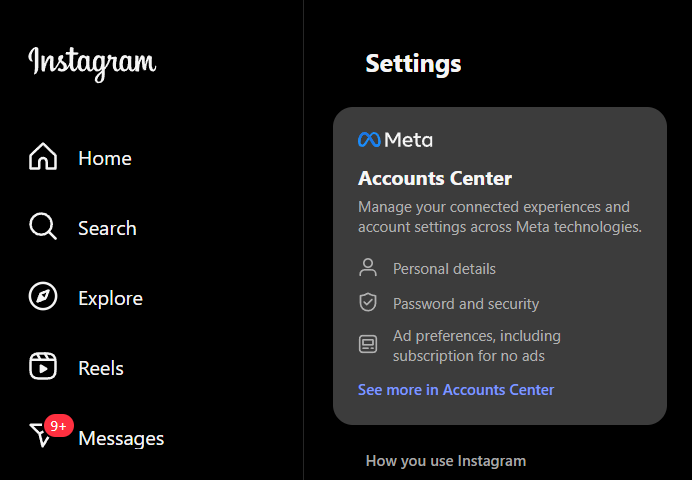
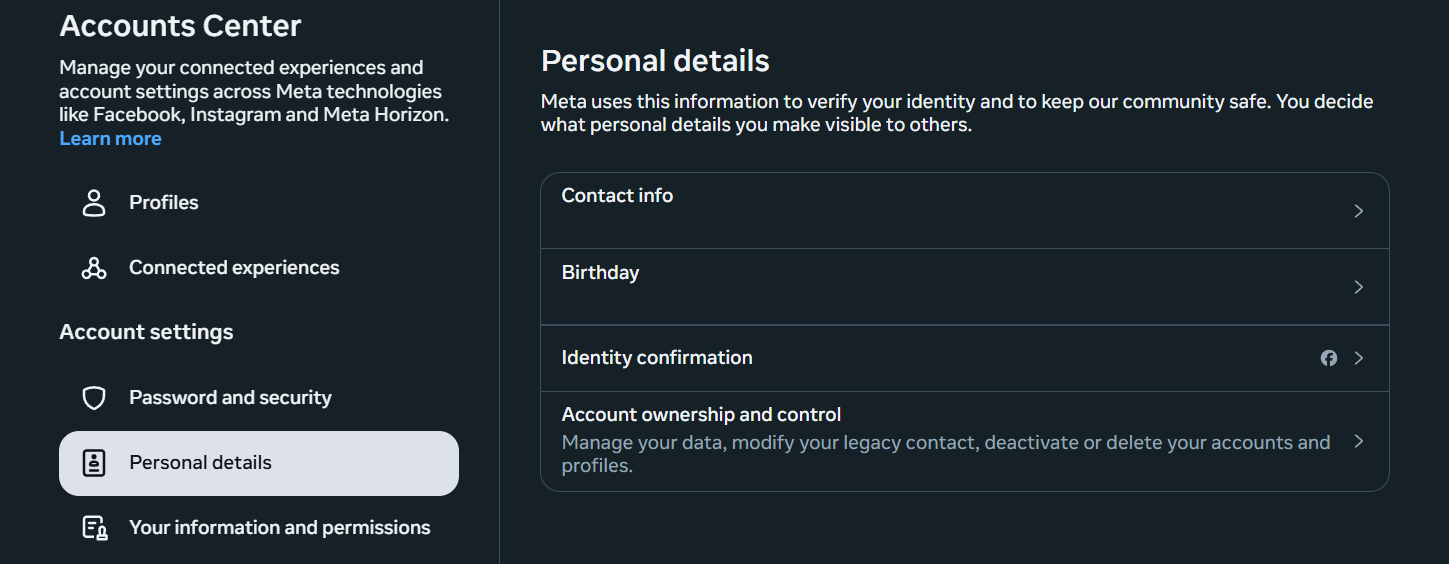
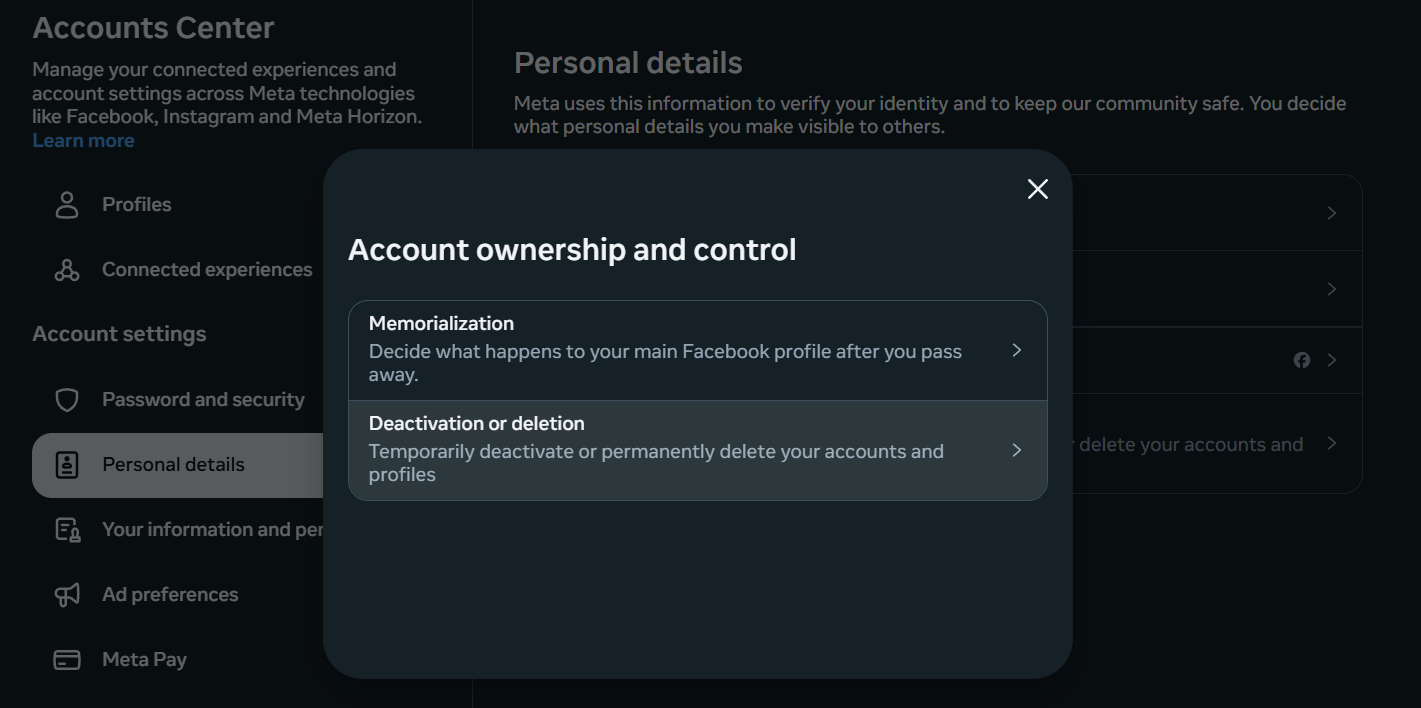
- Select Accounts center → Personal details → Account ownership and control.
- Select Delete or deactivate account.
- Select the account you want to delete.
- Choose Delete account.
- Instagram will prompt you for the reason and password to confirm the deletion.
- You will receive a notice that the account is permanently deleted in 30 days.
- This is how to remove an Instagram account permanently on your phone! :)
How to Temporarily Deactivate Your Instagram Account on Mobile
- Open Instagram and go to your profile.
- Tap the three horizontal lines.
- Go to Accounts Center → Personal details → Account ownership and control.
- Select Delete or deactivate account.
- Choose Deactivate account.
Take a break and learn how Snapchat delete accounts.
Learn How Do I Delete my Instagram Account Permanently on a PC or Mac
How to Delete my Instagram Account Permanently on a Computer?
- Go to Instagram.
- Log in to your account with your username and password.
- Select Accounts center → Personal details → Account ownership and control.
- Select Delete or deactivate account.
- Select a reason to delete the account.
- Enter your password again to confirm.
- Click Delete account permanently.
- This is how do you delete your Instagram account on a computer!
How to Temporarily Deactivate Instagram Using a Browser
- Log in to Instagram.
- Select Accounts center → Personal details → Account ownership and control.
- Select Delete or deactivate account.
- Select deactivate account.
- Choose a reason and confirm with your password.
- Reactivate your account at any time by logging in.
Common Issues When Deleting Instagram Account
Why Can't I Delete My Instagram Account?
This usually happens if:
- You try to delete it from the old app without access to Account Center.
- You don't remember your password or email address.
The account is linked to Facebook, and you have not logged out of both platforms.
Go to How Do I Delete Instagram account permanently link to find support.
How to Reset Your Instagram Password
- Open the Instagram app or website.
- Tap Forgot your password.
- Enter your email, username or phone number.
- Check your email or SMS and follow the link to reset it :)
How Do You Delete Instagram Accounts If You Can't Log In
If you do not have access to the associated email or phone, you can delete your account Instagram, recovering it from the Instagram help center below, and follow the identity verification process. In some cases, Meta may not be able to delete the account without verification.
How to delete Instagram page support.
How to Back Up Your Instagram Data Before Deleting Your Account
Steps to Download Your Instagram Data
- Open Instagram → Account Center → Your information and permissions → Download your information.
- Select the account.
- Choose the format (.zip or .json) and date range.
- Confirm with your password.
- You will receive an email with the download link.
What Data Can Be Saved?
It includes:
- Posts, comments, direct messages and photos.
- Account settings, search history, followers and followed.
- Data is not fully deleted immediately; Instagram saves it for a few days in case you cancel the request.
Discover how to clear Instagram cache.

How to Reactivate Your Instagram Account
Steps to Recover a Temporarily Deactivated Account
Just log in again with your username and password. All your content will be restored automatically.
How to Delete an Account on Instagram and then Recover It?
Following the deletion process, once 30 days have passed since the deletion, it is not possible to recover your account. You will only be able to create a new account with the same email, but the username may not be available.
Learn more about how to deactivate Instagram account.
Why Choose Stands Adblocker for a Better Online Experience?
Protect Your Privacy with Stands Adblocker
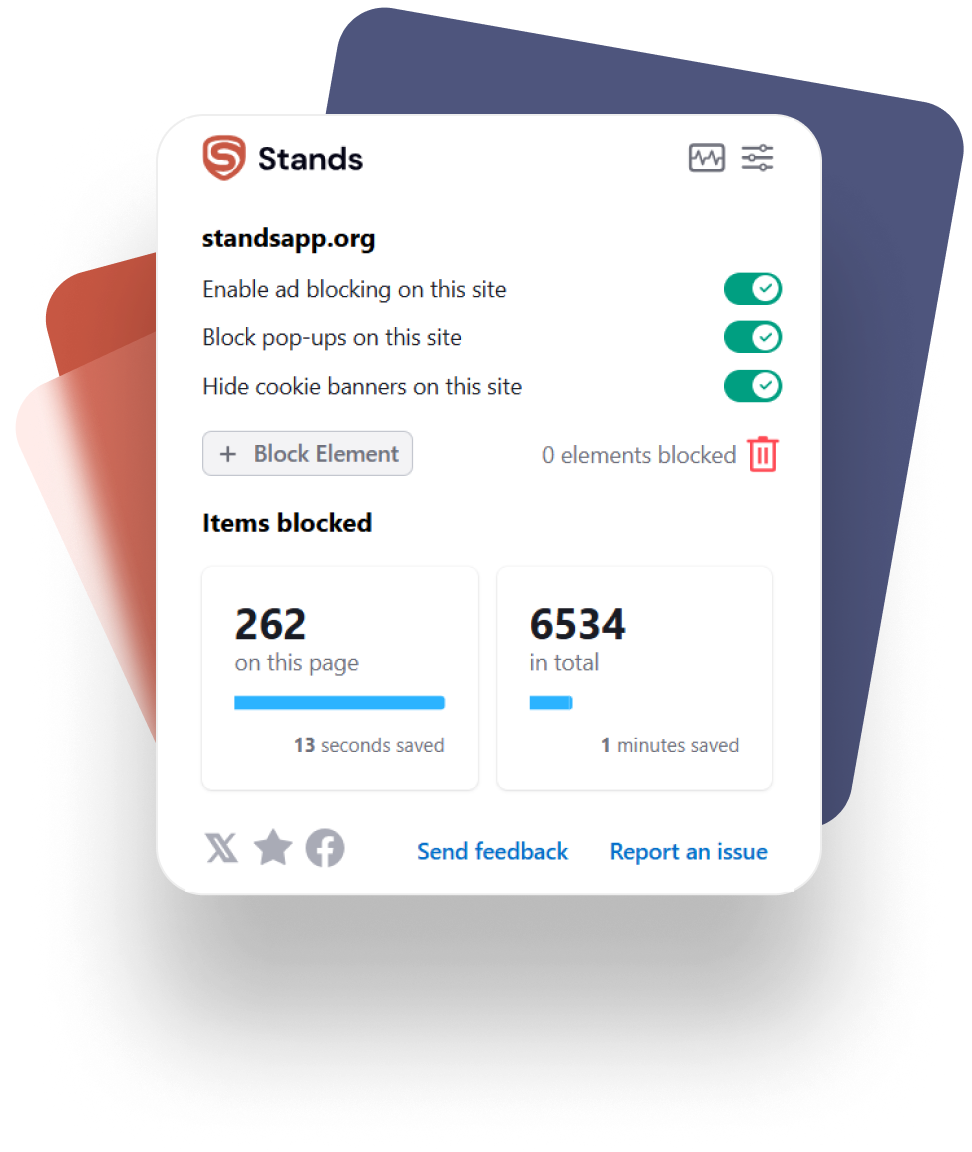
Stands Adblocker is an adblock extension that blocks ads, trackers and cookies that collect data while you browse or use social networks. Stands AdBlocker avoids online distractions and prevents social media platforms from collecting unnecessary information about your browsing habits :)
Advantages of Using Stands Adblocker
Faster and smoother browsing.
Protection against ads and malvertising.
Reduced tracking and cookies by third parties.
Improved visual experience by eliminating distractions.
How Stands Adblocker Works with Instagram
Although Instagram doesn't allow adblockers within its mobile app, Stands Adblocker filters out ads, cookies and trackers when you access from browsers like Chrome, Firefox, or Edge on desktop.
FAQs About Deleting Instagram Account
How do You Delete an Instagram Account Without Logging In?
It is not possible to erase Instagram account without logging in first. Instagram requires identity verification to make sure you are the right account holder. If you have forgotten your password or no longer have access to the associated email or phone number, you will first need to regain access. You can do this from the login screen by selecting "Forgot your password?" or by accessing the Meta help form to recover the account. This is how do you delete an account on Instagram without logging in!
How to Delete Instagram Profile Without a Password?
The password is mandatory for Instagram to delete an account. However, if you do not remember your password, you can easily reset it:
- Open the Instagram phone app or website.
- Click on "Forgot your password?".
- Enter your email, username or linked phone number.
- Review the link sent by mail or SMS and create a new password.
- Once done, you will be able to log in and continue with the deletion process.
How to Delete an Instagram Account Without a Phone?
You can delete an Instagram account from a computer or tablet without using your phone. You just need to access instagram.com/accounts/delete from a browser and log in with your credentials. But, how to delete account on Instagram without a phone specifically? The process is basically the same: Select the reason for deletion, confirm your password and click "IG Delete account permanently".
How Can you Delete an Instagram Account Without your Followers Knowing?
Instagram does not notify your followers when you delete or deactivate your account. Your profile simply ceases to exist:
- They won't be able to access your posts, send messages, or see your name in their follower lists.
- Your DMs will be deleted, but the messages you sent will remain visible to the recipient.
If you decide to temporarily deactivate your account instead of deleting it, your profile will be visible again when you log in again! :)
How to Delete IG Account if It's Linked to Facebook?
Since 2023, Meta unified the management of Instagram and Facebook through the Account Center, so linked accounts must be deleted or deactivated from there. How to close Instagram account permanently if linked to Facebook?:
- Open your account via Settings → Account Center (from Instagram or Facebook).
- Go to Personal information → Account ownership and control.
- Choose the linked Instagram account.
- Tap Delete or deactivate and select Delete account Instagram. This will only affect Instagram and will not automatically delete your Facebook account.
- This is how to delete Insta account linked to Facebook.