
 Home »
Stop Chrome Pop-Ups: Improve Your Browsing Experience
Picture this: You are reading a great article or shopping online. Suddenly, a flashing window steals your screen. This completely ruins your mood! Let’s face it, unexpected windows pop up everywhere on the web today. If you use Google Chrome, you see them all the time.
Learning how to stop pop up ads on chrome changes everything. It gets rid of digital clutter and keeps you safe from sketchy links. It also makes your browsing smooth and fast. Thankfully, you do not need a tech degree to control your screen. In this guide, we will show you exactly how to stop pop up ads in chrome for good. We cover computers, Android phones, and iPhones.
- Why Block Pop-Ups on Chrome?
- Are All Pop-Ups Bad?
- How to Enable Chrome's Native Pop-Up Blocker
- How to Block Pop-Ups in Chrome — iPhone (iOS)
- How to Block Pop-Ups in Chrome — Android
- How to Allow Pop-Ups for Specific Sites
- How to Recognize a Dangerous Pop-Up
- How to Block Pop-Ups with an Ad Blocker
- Pop-Ups Still Appearing? Troubleshooting Steps
- Conclusion
- FAQ
Why Block Pop-Ups on Chrome?
The most obvious reason is that they drive us crazy. But beyond the annoyance, blocking pop ups on chrome helps your digital health. When you actively prevent pop ups on chrome, you protect your computer or phone.
Here is why you should keep these bad windows away:
- Speed Up Browsing: Every unexpected window forces your browser to work harder. When you block popups, pages load much faster. Your system runs smoother too.
- Keep Malware Away: Many sketchy windows contain dangerous links or adware. Scammers design them to look like real sites. A single bad click can download harmful software or steal your information.
- Save Mobile Data: If you use a tablet or phone, big ads eat up your data plan quickly.
Here is how a clean browser compares to an unprotected one:
| Feature | Clean Browser (Protected) | Unprotected Browser |
| Page Speed | Fast and snappy | Sluggish and slow |
| Data Use | Minimal | High (loads extra ads) |
| Security | High (blocks bad code) | Vulnerable to malware |
| Distractions | Zero distractions | Constant interruptions |
Are All Pop-Ups Bad?
Not at all! Many people hate annoying ads, but some websites need pop-ups to work. If you block all pop ups chrome wide, you might break features you actually need.
For example, safe websites use separate windows for these important tasks:
- Login Windows: When you click "Log in with Google" or Facebook, a new screen opens. This processes your login details safely.
- Payment Screens: Many stores use secure extra windows to handle credit cards or PayPal.
You just need the right balance. You want to block pop up ads chrome throws at you, but you still want helpful features to work.
How to Enable Chrome's Native Pop-Up Blocker
Google Chrome offers a built-in pop-up blocker that helps reduce pop-ups. Because this pop-up blocker is already pre-installed, it is usually enabled by default. Let's verify below if this is your case.
How to Block Pop-Ups in Chrome — Desktop (Windows & Mac)
If you use a PC or a Mac, Google Chrome has a built-in tool. It handles a lot of the work for you. Turning it on takes less than a minute. It will immediately control pop ups in chrome.
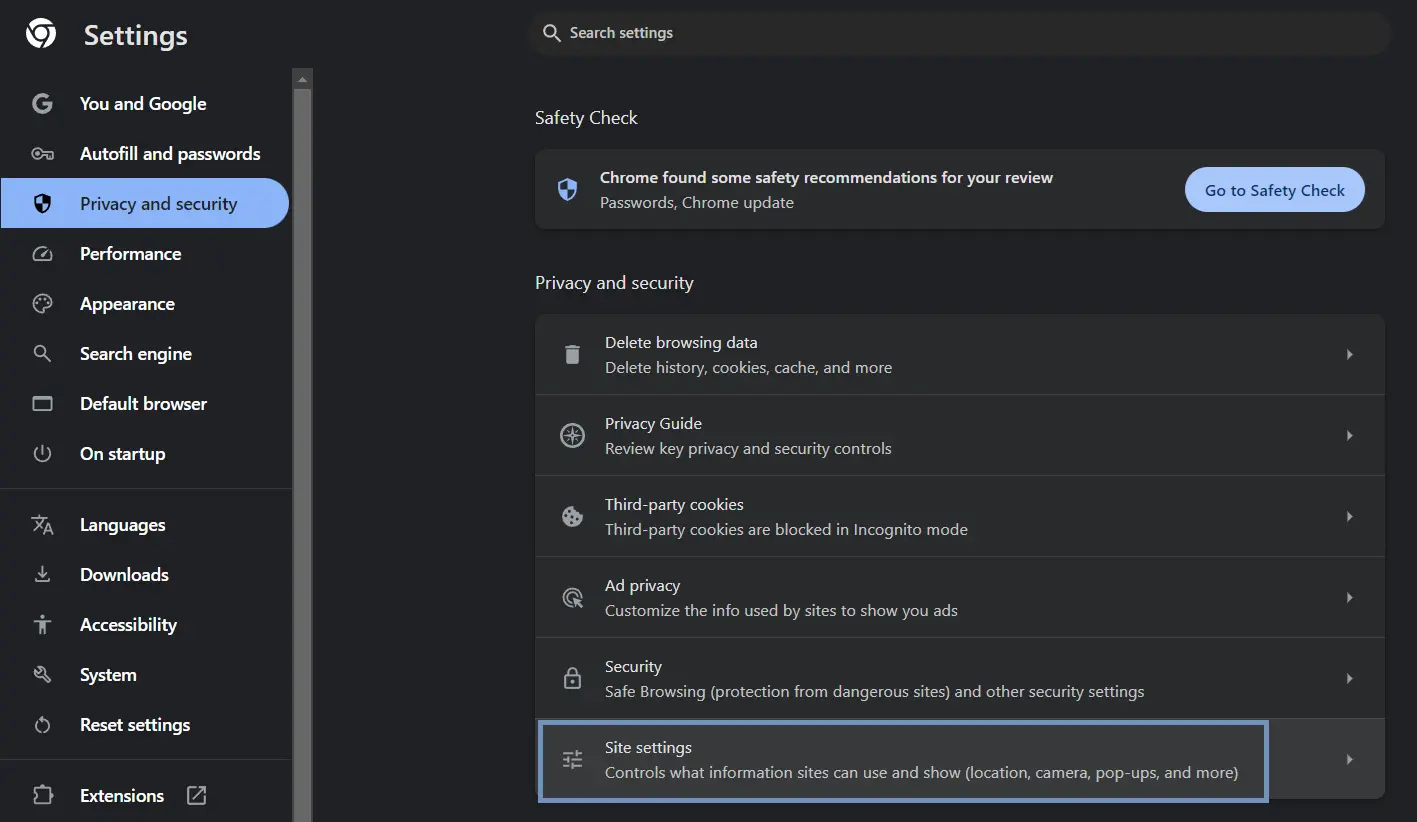
Follow these steps to configure google chrome to block all pop ups on your computer:
- Select Settings from the list.
- Click Site Settings in the main area.
- Scroll down to the Content section and click Pop-ups and redirects.
- Under Default behavior, select: "Don't allow sites to send pop-ups or use redirects."
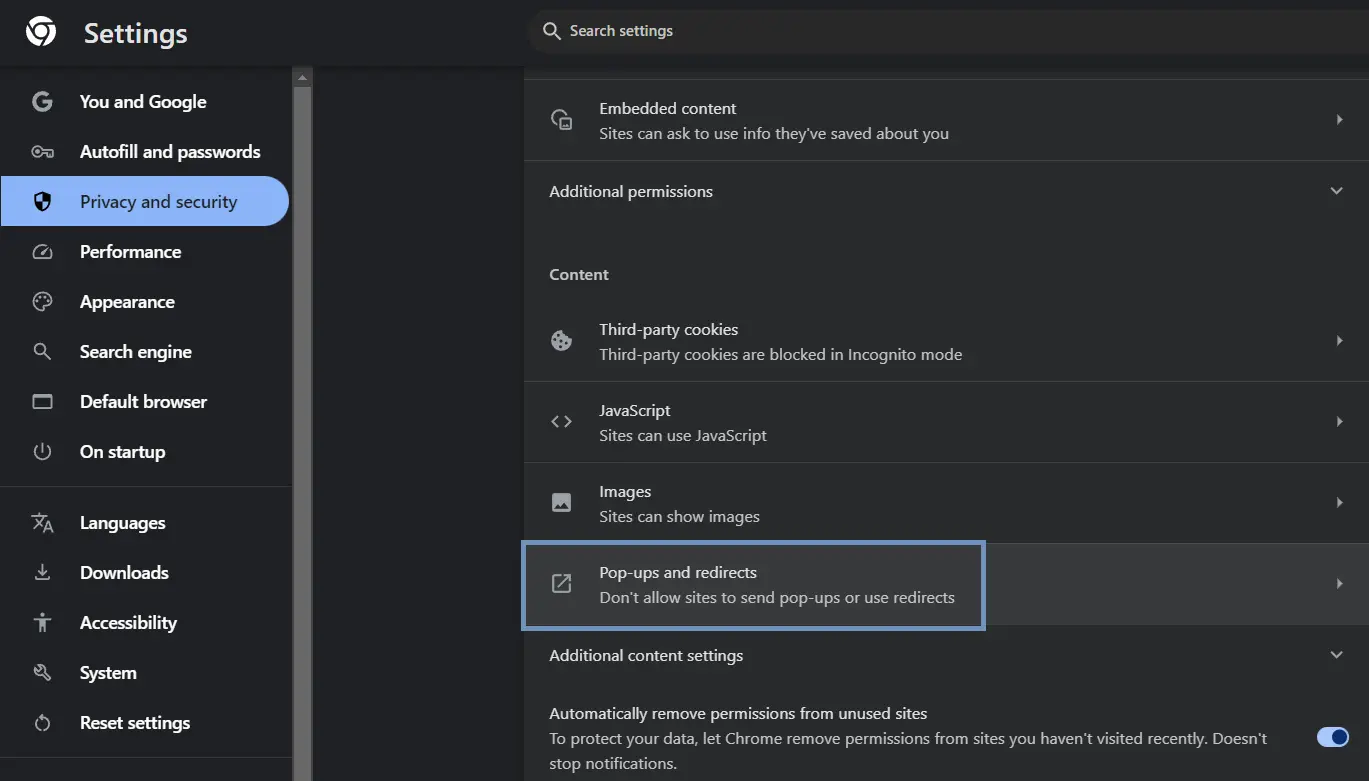
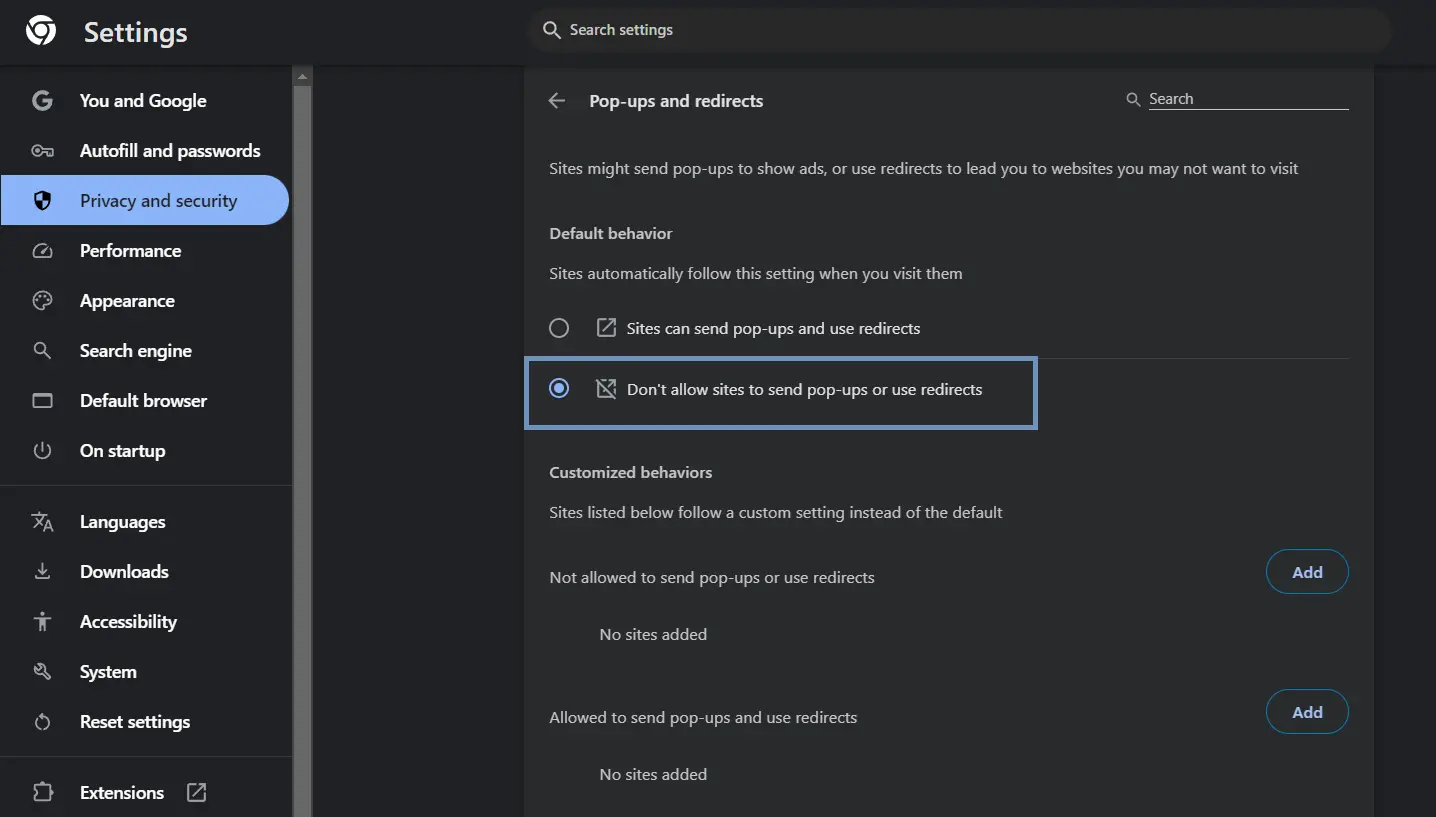
Now, Chrome will automatically block the pop up in chrome when a site tries to open one. When Chrome stops a window, a tiny icon appears in your address bar. It looks like a window with a red 'X'.
Pro Tip: Here is a fast shortcut. Next time you visit a site, click the lock icon next to the URL in the address bar. Select Site settings. This takes you straight to the permissions for that specific website!
What Chrome's Blocker Misses
Manage your expectations here. The built-in tool stops basic windows, but it does not stop standard banner ads or video ads. To completely block ads and pop ups in chrome, you need a more powerful, advanced pop up blocker chrome extension.
5. Click Pop-ups and redirects.
6. Select Don't allow sites to send pop ups or use redirects on Chrome.
How to Block Pop-Ups in Chrome — iPhone (iOS)
Browsing on an iPhone or iPad becomes a headache when a site redirects you constantly. Luckily, you can block all pop ups in chrome for iOS with a few quick taps.
Follow these steps to protect your Apple device:
- Open Chrome on your iPhone or iPad.
- Tap Settings.
- Scroll down and select Content Settings.
- Tap Block Pop-ups.
- Turn the switch ON (the toggle turns blue).
Now, Chrome keeps your screen clear while you browse on your mobile device.

How to Block Pop-Ups in Chrome — Android
The steps look a bit different on an Android phone or tablet. However, you have the exact same goal: you want to learn how to stop pop-ups on chrome to keep your screen clear.
Follow these steps for your Android device:
- Open Chrome on your Android phone.
- Tap the three vertical dots in the top-right corner.
- Select Settings.
- Scroll down and tap Site settings.
- Tap Pop-ups and redirects.
- Turn the switch to Block (this stops sites from showing them).
This setting keeps your screen clean. You will not have to close accidental tabs constantly.
How to Allow Pop-Ups for Specific Sites
As we said before, some sites need extra windows. If your bank or school uses windows to show bills or receipts, you can add them to your safe list.
You do not need to turn off your safety net for the whole internet. Instead, you can allow or block pop ups in chrome for single sites.
On Desktop:
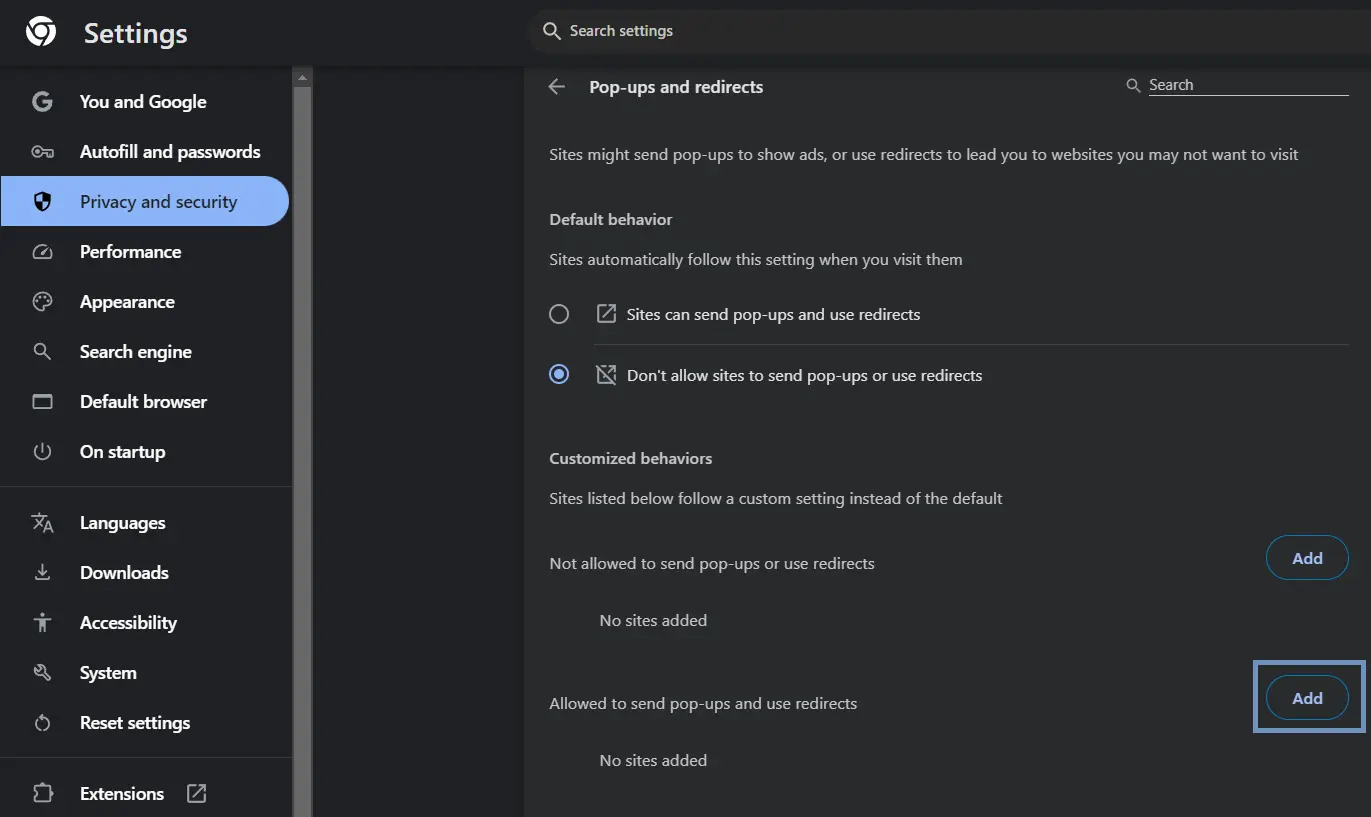
Visit the site you trust. Look at the right side of the address bar. If Chrome blocked a window, you will see the icon with the red 'X'. Click it, choose "Always allow pop-ups and redirects from [website URL]", and click Done. You can also go to your Pop-ups and redirects settings page, scroll to Customized behaviors, and click Add next to the allowed section.
On Mobile (Android/iOS):
When Chrome blocks a window on your phone, look at the top or bottom of your screen. You will see a small banner that says Pop-up blocked. If you trust the site, tap Always show right on that banner.
How to Recognize a Dangerous Pop-Up
Sometimes, a tricky window slips past Chrome. Knowing how to spot a bad window saves you from identity theft, scams, or virus infections.
Watch out for these 4 big red flags:
- The "Your PC is Infected" Warning: These are scare tactics. They look like real antivirus software and claim you have 15 viruses. Real antivirus apps never warn you through a random internet window.
- Countdown Timers: A window might claim you have 2 minutes to win a prize or update your browser. This is always a trap. Scammers want you to act fast before you think.
- Messed-Up URLs: Always check the address bar. If a window claims to be Amazon but the URL reads security-update-9482.biz, close it fast!
How to Block Pop-Ups with an Ad Blocker
Chrome's default settings are not enough for total peace. The built-in tools only catch simple triggers. To completely block pop ups on chrome—including video ads, banners, and hidden scripts—you need a real ad blocker.
Stands AdBlocker (Our Top Pick)
For a perfect online experience, install a high-quality free AdBlocker. Stands AdBlocker is excellent because it changes how you experience the web.
It works perfectly as an ad blocker chrome extension. It protects your privacy, cuts out trackers, and blocks pop up ads Chrome misses. It also saves your battery and mobile data because it stops heavy ads before they load. If you hate video interruptions, it works as a great tool to block ads on youtube so you can watch creators in peace.
Installation is very simple:
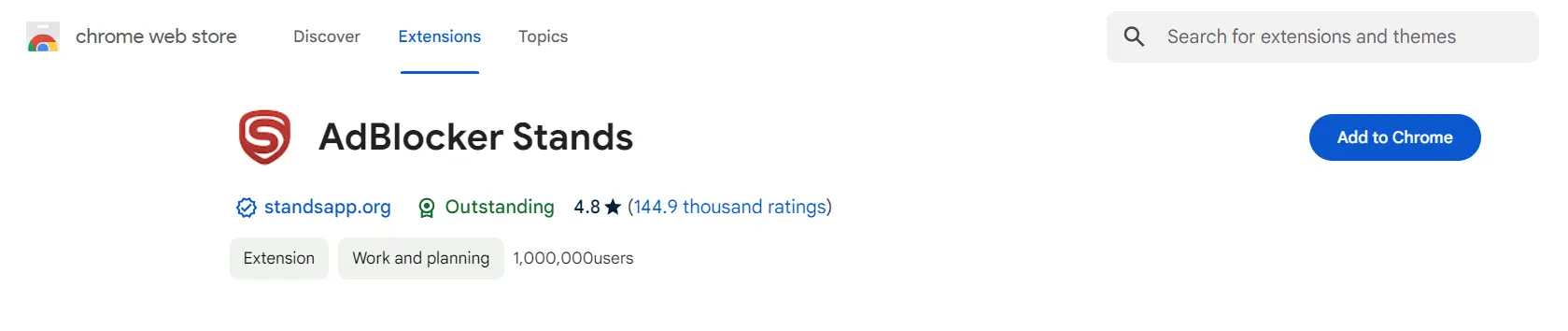
- Go to the Chrome Web Store and search for Stands AdBlocker.
- Click Add to Chrome and confirm.
- Click the puzzle piece icon in your toolbar and pin the Stands icon.
- That is it! The tool works automatically to clean your web.
Other Options
Stands is our top choice because it is fast and lightweight. However, you can check out these other options:
- AdBlock: This classic option works reliably, but it can slow down your system resources sometimes.
- uBlock Origin: This powerful extension fits tech-savvy users who want to change filters manually.
- Ghostery: This tool focuses on privacy and tracking blocks, but the interface takes time to learn.
Pop-Ups Still Appearing? Troubleshooting Steps
If you turned on all the right settings but still see random windows, do not panic. Something else is wrong under the hood.
Try these simple steps to fix the issue:
- Remove Rogue Extensions: Sometimes, a bad extension slips into Chrome and shows ads. Go to chrome://extensions/ and check your list. If you see an app you do not know, click Remove.
- Scan for Malware: If ads appear when your browser is closed, adware might infect your computer. Run a scan with trusted antivirus software.
Conclusion
You should not have to fight for control over your own screen. Combine Chrome's built-in options with a strong pop up blocker for chrome like Stands. This setup stops annoying ads easily. Say goodbye to distractions and enjoy a faster, safer web!
FAQ
Why is Chrome blocking pop-ups on a site I trust?
Chrome’s built-in tool uses simple automation. It cannot tell the difference between a bad ad and a useful login window. It shuts down any script that tries to open a new window. To fix this, click the lock icon in your address bar and select "Always allow" for that site.
What is the difference between a pop-up and an ad?
A pop-up is a specific window that opens automatically over your main view. An ad can be anything, like a sidebar banner or a video commercial. All pop-up ads are ads, but not all ads are pop-ups. A tool like Stands blocks both easily.
Does Chrome's pop-up blocker work on iPhone?
Yes, it does! The iPhone version of Google Chrome has a built-in block toggle. Open the app menu, go to Settings, select Content Settings, and turn on Block Pop-ups.
Why do I still see pop-ups after enabling Chrome's blocker?
Chrome's native blocker only catches simple windows. It misses advanced scripts, redirects, and ads from computer malware. To stop them completely, use an extension like Stands and scan your device for adware.
How do I know if a pop-up is dangerous?
Watch out for scare tactics, fake virus warnings, and countdown timers. Also avoid windows that hide the close button. Always check the URL. If the web address looks messy or random, close it immediately.

