
 Home »
How to Block Pop-up Ads on Mobile: The Ultimate 2026 Guide
I tap a search result expecting a clean article, but a huge ad covers my entire screen instead. I look for the exit, but I only find a tiny, nearly invisible pixel for an "X" button. When I try to tap it, the page triggers a forced redirect anyway. Before I can hit the back button, a flashing fake system alert locks my screen, claiming my phone has three dangerous viruses. :)
Also, we have to remember that ad networks rely on complex JavaScript execution, DOM overlays, and script-rotation to completely bypass standard browser blocks. I learned during my testing that Chrome's default pop-up blocker is a relic from 2018. If you don't use a hardened filtering engine, you aren't really protected against malvertising and deceptive UI patterns.
When people ask me how to block pop-up ads on mobile, I explain that mobile ad tech doesn't ask for permission. It manipulates page rendering and hijacks touch events to force engagement. To get rid of pop-up ads on Android and iOS, you need tools that stop ad execution before the initial DOM payload completes.
| The 30-Second Fix |
| Install the Stands Adblocker Browser for Android, which removes all redirects, interstitials, and overlay ads. |
Why Mobile Pop-ups Are More Aggressive in 2026
I tested dozens of ad-heavy sites to analyze how rogue networks bypass standard browser safeguards. The economics of web publishing push ad networks to deploy invasive mechanics that exploit how mobile WebKit and Chromium engines render elements.
| How Modern Mobile Pop-ups Attack Your Phone |
| 1. Touch Interception: A deceptive UI overlay catches your tap instead of the article text. |
| 2. Script Execution: The page executes background JavaScript redirects and rewrites your browser history. |
| 3. Resource Hijacking: Forced redirects load phishing links or fake system alerts while background tracking scripts trigger severe battery drain and data throttling. |
Dark Patterns and Forced Navigation
During my research, I noticed that website monetization relies heavily on "dark patterns" (*interface designs intentionally crafted to trick users into taking unintended actions). On small mobile screens where space is tight, ad networks place transparent HTML <div> containers right over the main body text. The moment I tap anywhere to scroll down, that invisible backdrop executes a background listener that opens an intrusive interstitial or starts forced navigation.
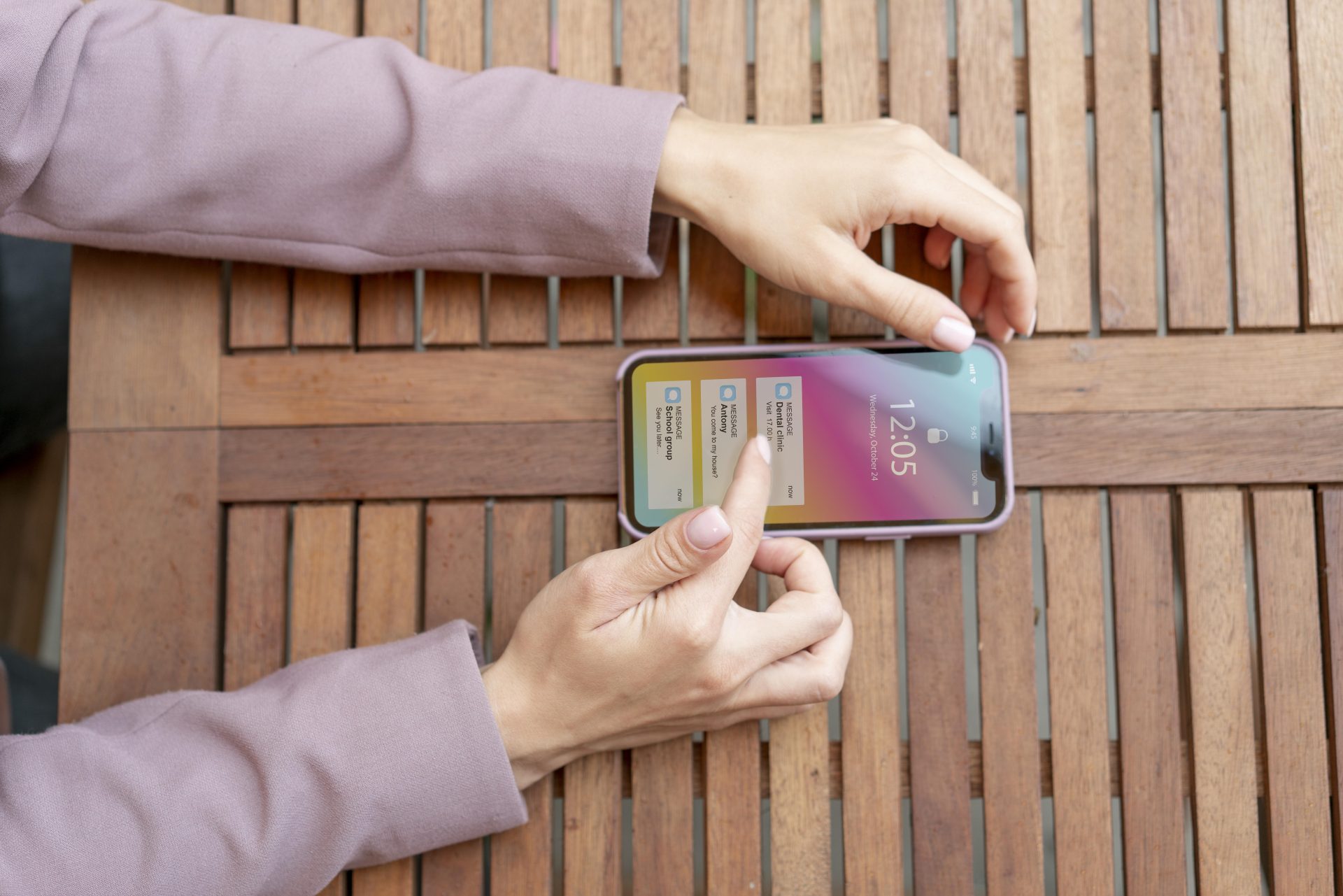
At the same time, these ad scripts mess up with browser history APIs like history.pushState(). How? When I hit my phone's "Back" button to escape a spam page, the browser does not take me back to my search results. Instead, the script locks me into an infinite redirect loop. It forces my browser to cycle through multiple ad impressions before I can manually close the tab.
The Cost of Ad-Scripts
Ads do not just ruin your browsing; they actively drain your device's actual physical resources. Malvertising campaigns run constant script-rotation in the background, firing off endless real-time bidding (RTB) calls and dynamic DOM filtering evasions every single second.
| Performance Metric | Impact of Unblocked Ad Scripts |
| Battery Drain | Unchecked background scripts keep CPU cores running at high clock speeds, causing rapid thermal throttling and battery loss. |
| RAM Usage | Complex JavaScript overlays leak memory, which triggers browser freezes, unexpected tab reloads, and system slowdowns. |
| Data Throttling | Large background video ads and constant tracking telemetry silently waste your monthly mobile data allowance. |
| Page Latency | Unoptimized ad calls block the browser's main rendering thread, delaying First Contentful Paint (FCP) and leaving pages unresponsive. |
How to Stop Pop-up Ads on Your Android
I found a few ways to deal with it. Android's open setup gives you enough choices, but it also leaves your device exposed to ad scripts, so let’s check what we can do together.
Chrome Site Settings vs. Stands Adblocker Browser
Google Chrome includes basic built-in controls to block pop-ups on my phone, but Chrome's underlying framework still leaves gaps for complex ad scripts to slip through.
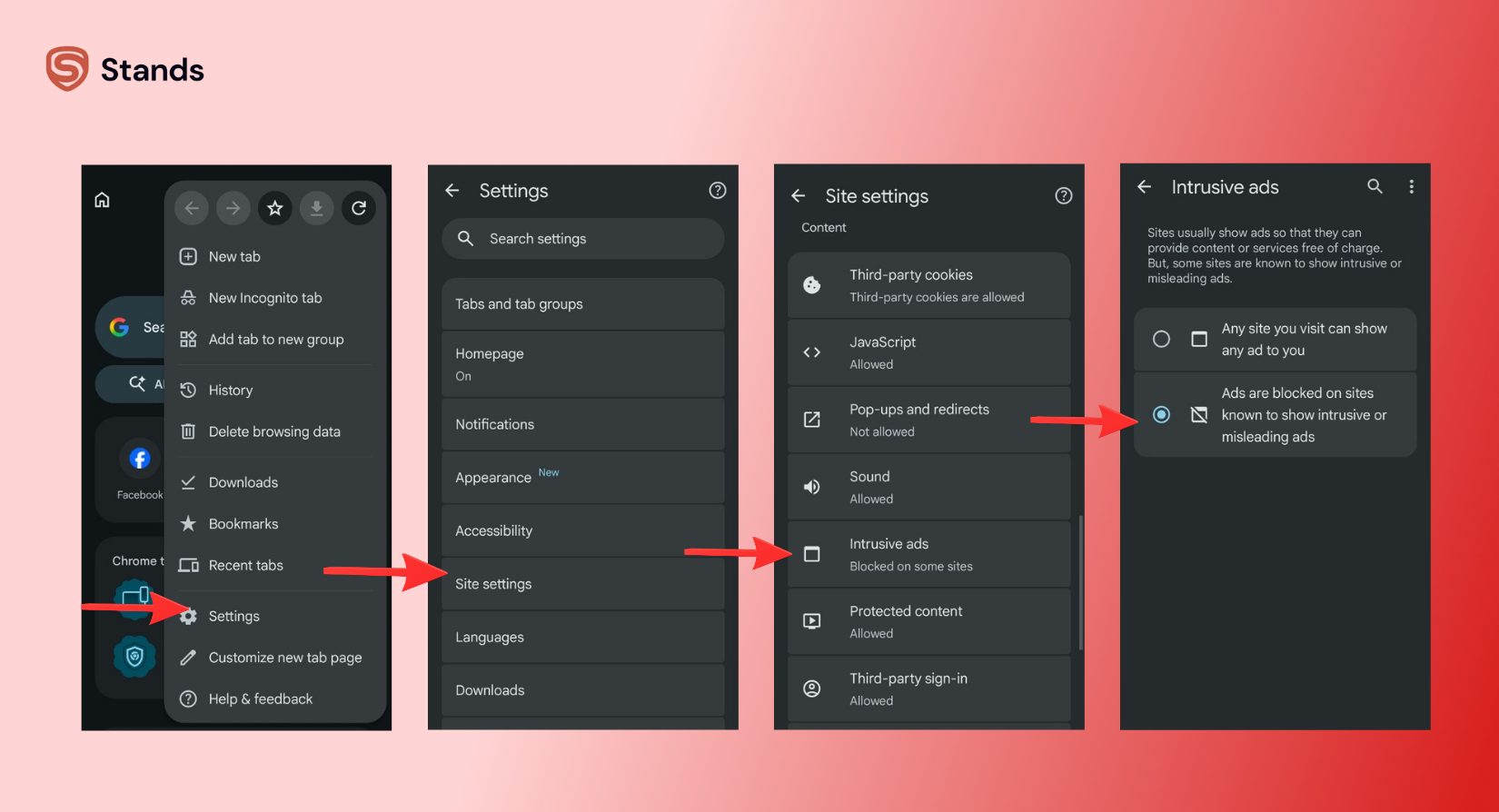
I tested its built-in pop-up rules using these exact steps:
- Open Google Chrome on your Android phone.
- Tap the three dots in the top-right corner and tap Settings.
- Scroll down and select Site settings.
- Tap Pop-ups and redirects and turn the switch Off (Blocked).
- Go back, tap Intrusive ads, and set it to Off.
If you want to review Google's official instructions for these controls, check out the Google Chrome Pop-Up Help Guide as well as the Google Chrome Site Settings Guide.
While these settings clean up basic window pop-ups, Chrome frequently fails against SSAI bypass (Server-Side Ad Insertion) and dynamic script injection. This is why I rely on an Android ad blocker browser like Stands Adblocker.
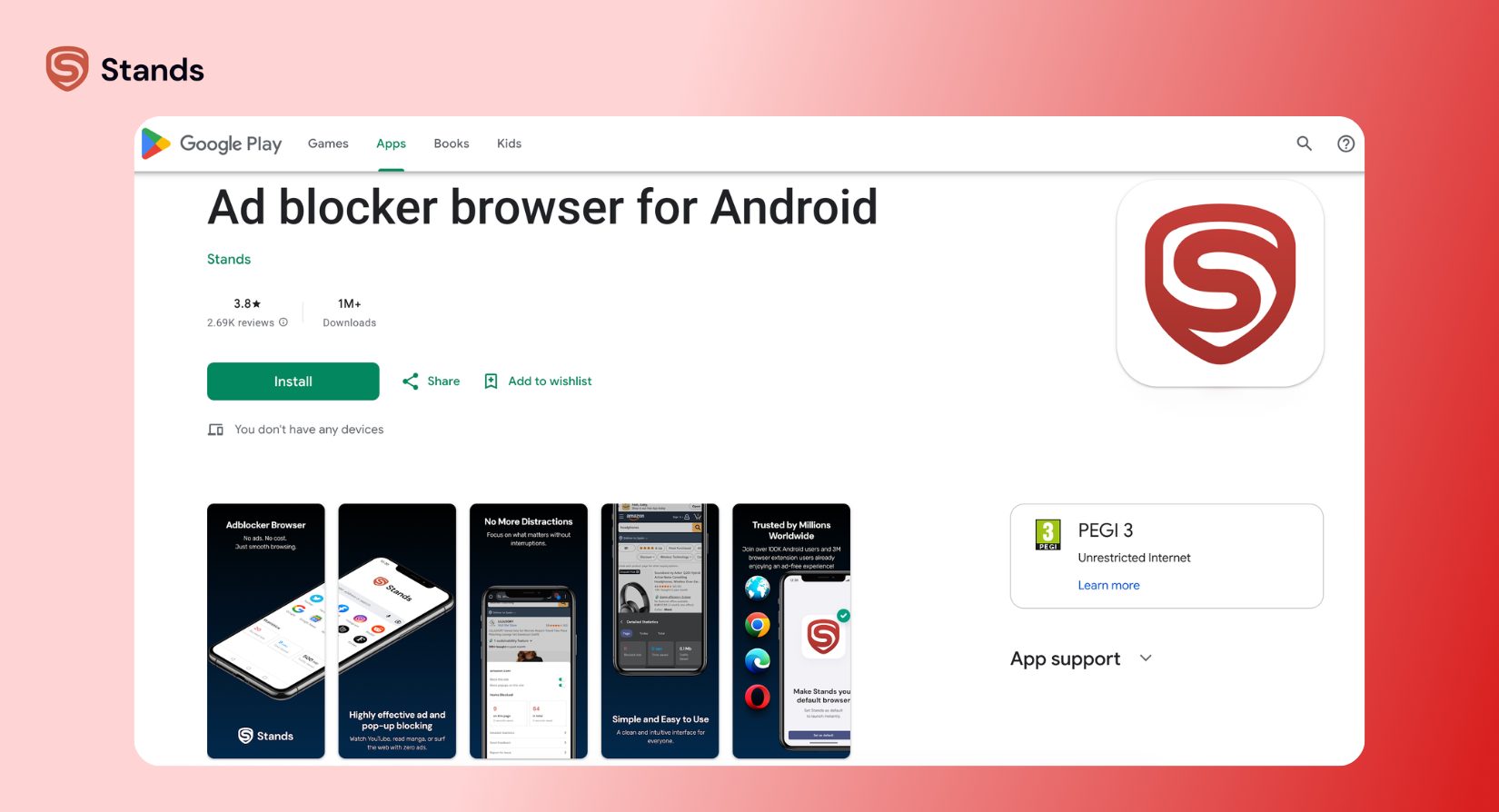
In my tests, Stands uses hardened filtering logic and native snippet injection to neutralize ad scripts before they parse inside the DOM. Instead of reacting after a pop-up appears, Stands prevents the touch event from binding to the screen in the first place. I also verified that Stands operates completely without root access, so your system security stays 100% intact.
Using Private DNS for System-Wide Protection
And that is another great option. If you want a reliable pop-up blocker for mobile that protects you outside the browser, like inside free utility apps or mobile games, you can enable DNS-over-HTTPS filtering inside Android settings.
| Connection Setup | Domain Query Path | Result |
| Standard Connection | Device → Default ISP DNS → Ad Server | Loads ad scripts, pop-ups, and trackers |
| Filtered DNS Connection | Device → Ad-Blocking Private DNS | Drops malvertising requests instantly at 0ms latency |
I configured Private DNS on my test phone using these simple steps:
- Open your Android device Settings.
- Tap Network & internet.
- Select Private DNS.
- Choose Private DNS provider hostname.
- Enter a secure ad-blocking host such as dns.adguard.com.
- Tap Save.
This sends your internet requests through a filter. Whenever an app tries to connect to a known ad site, the DNS filter blocks the connection right away.
How to Block Pop-up Ads on iPhone (Safari)
Apple builds strong security features, but ad networks still find ways you. I combine built-in iOS toggles with active content blocking tools to block pop-up ads on Safari.
Native iOS Settings and Content Blockers
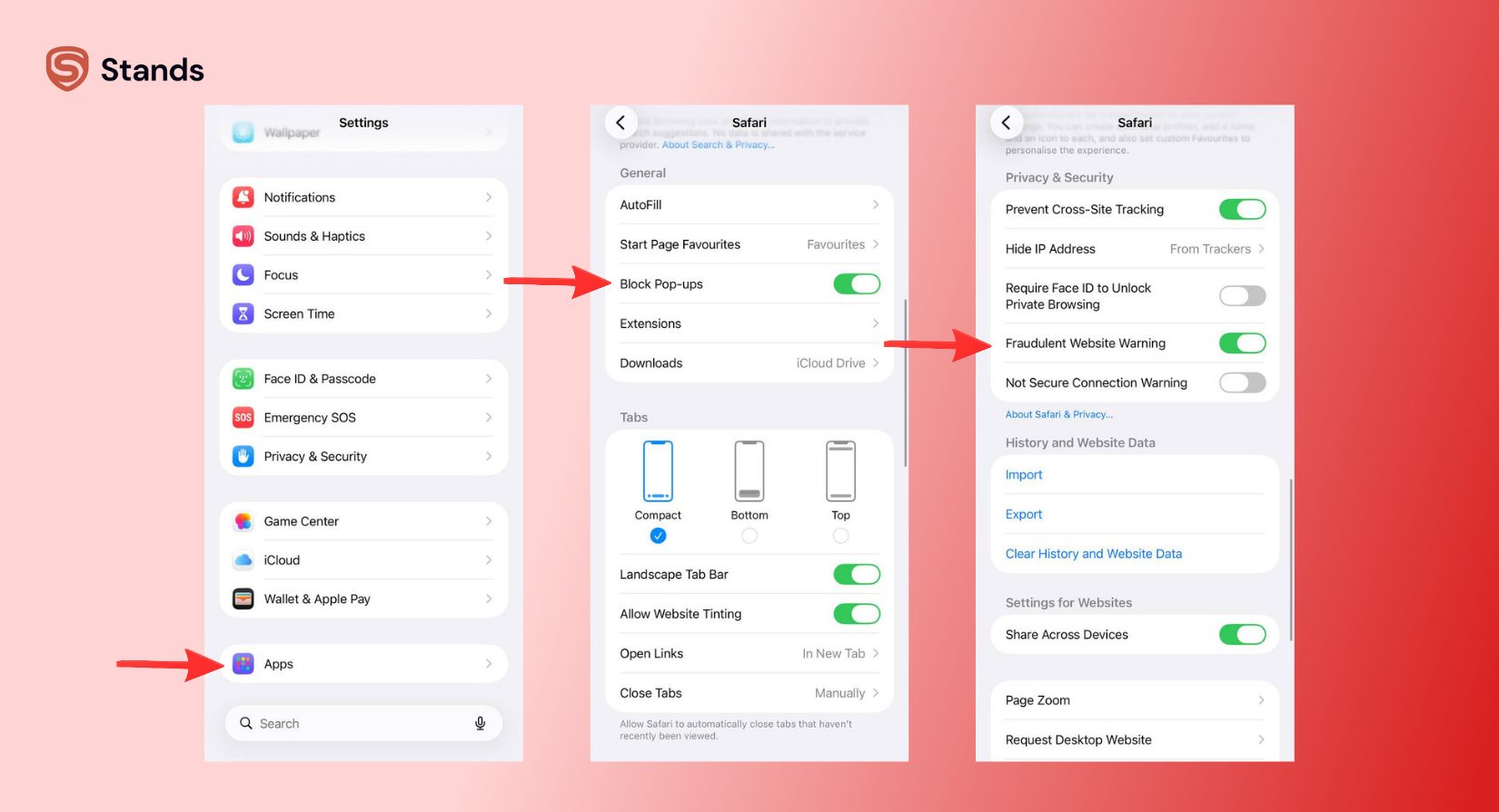
First, I turned on Apple's baseline Safari protections:
- Open Settings on your iPhone.
- Scroll down and tap Safari.
- Toggle on Block Pop-ups.
- Toggle on Fraudulent Website Warning.
For full details on Apple's default browser protection, read the official Apple Safari Support Guide.
Troubleshooting
If you enabled browser and DNS filters but still see full-screen takeovers on your home screen or inside normal apps, your device might have a hidden adware infection.
Detecting Malicious Adware Apps
Adware rarely uses its real name. Developers disguise adware as simple free tools like a flashlight app, a unit converter, or an offline calculator. Once installed, the app requests special permissions to draw overlays on top of your active screen.
| How Malicious Adware Takes Over Your Interface |
| Step 1: The app requests "Display over other apps" permission during installation. |
| Step 2: The user grants permission without realizing the security risk. |
| Step 3: The adware app launches invisible full-screen windows to trigger fake system alerts over your launcher. |
I use these steps to find and delete "bad" apps on Android:
- Check special app permissions: Go to Settings > Apps > Special app access > Display over other apps. Look through the list carefully. I turn off this permission for any simple tool or game that doesn't really need to draw over my screen.
- Clear browser cache: If pop-ups stay stuck in your browser, clear out saved site data. Go to Settings > Apps > Chrome > Storage & cache > Clear storage.
If you use a Samsung phone and want additional device-specific guidance, read the official Samsung Adware & Pop-up Support Guide.
FAQ: Mobile Pop-up Fixes
Why are pop-ups still appearing with an active ad blocker?
Ad networks use dynamic script-rotation and constantly switch their domain names to bypass basic blocklists. Standard ad blockers that rely on static URL lists are bypassed until their filters are updated. Advanced tools like Stands stop pop ups android users face by using DOM filtering and snippet injection to block the underlying behavior of the ad script rather than relying only on its web domain.
Can a mobile pop-up infect my phone?
Just a fact of opening a pop-up page rarely installs a virus on modern phones because phone systems keep apps separate. However, pop-ups often go to dangerous scam websites, so you have to be careful.
How do I remove a "System Warning" or "Virus Detected" pop-up?
I never tap "OK," "Clean Now," or the close button on a suspicious virus notification inside a browser. Scammers build fake system alerts to scare you into installing malicious software.
- DO NOT touch any part of the warning message.
- Swipe the tab away to close it completely.
Is there a truly free pop up blocker for mobile?
Yes. I rely on Stands Adblocker browser because it gives me complete protection against pop-ups, redirects, and trackers for free.

