
 Home »
Soundcloud Ad Blocker: 6 Ways to Block Ads on SoundCloud
If you use SoundCloud often, you already know how it goes: you're vibing to a track, the beat drops… and suddenly you’re hit with a loud car insurance ad you never asked for. SoundCloud can throw audio ads, banner ads, and video ads at you depending on your region, your platform, and how often you listen.
The good news? You can reduce, block, or remove many of these ads in both free and paid ways. Below are 6 effective SoundCloud ad blocker solutions that work on desktop, Android, iOS, and even system-wide setups.
We are going to talk about six ways to get rid of SoundCloud ads or at least make them less annoying. We will check each of these methods so you can listen to music on SoundCloud without ads and without having to figure things out on your own :)
- Why Does SoundCloud Have So Many Ads?
- Best SoundCloud Ad Blocker Solutions
- Use Ad Blocker Extension (Desktop)
- Subscribe to SoundCloud Go or Go+
- SoundCloud Ad Blocker for Android
- How to Remove SoundCloud Ads on Windows and macOS
- How to Block Ads on SoundCloud iPhone and iPad
- VPN Method: Change Location Settings to Reduce Ads
- Which Ad Blocker SoundCloud Solution Is Right for You?
- Frequently Asked Questions (FAQ)
Why Does SoundCloud Have So Many Ads?
SoundCloud uses ads to pay artists and keep the platform alive. They don’t just show ads for fun — they make money either by:
- showing you targeted ads, or
- selling your listening data to advertisers
And the more you listen, the more ads you’ll hear. If you get a lot of SoundCloud ads, it usually means:
- Your region has high ad volume
- You’re using the free plan
- You listen for many hours per week
- You’re on the mobile app, which shows more ads than the desktop
- Last but not least, your account is heavily targeted by advertisers
Ads can pop up on Windows, macOS, Android, iPhone, iPad, and even in browser versions. Luckily, you have several ways to block or at least reduce them.

Best SoundCloud Ad Blocker Solutions
Here are the 6 proven ways to block ads on SoundCloud:
- Use a browser ad blocker extension
- Subscribe to SoundCloud Go / Go+
- Use a mobile ad blocker app
- Block ads on the desktop app (Windows/macOS)
- Block ads on iPhone and iPad
- Change location via VPN
Let’s check them together one by one.

Use Ad Blocker Extension (Desktop)
If you mostly listen to SoundCloud on your browser, this is the easiest fix. A good ad blocker for SoundCloud blocks:
- audio ads
- video ads
- trackers that target you with more ads
Popular picks include the Chrome ad blocker extension from Stands.
Why this works well:
- Blocks SoundCloud ads instantly
- Doesn’t slow down your browser
- Stops trackers from targeting you
- Works on Chrome, Edge, Brave, and more
If you’re comparing options, here’s a helpful review of Stands Adblocker vs Total Adblock.
Subscribe to SoundCloud Go or Go+
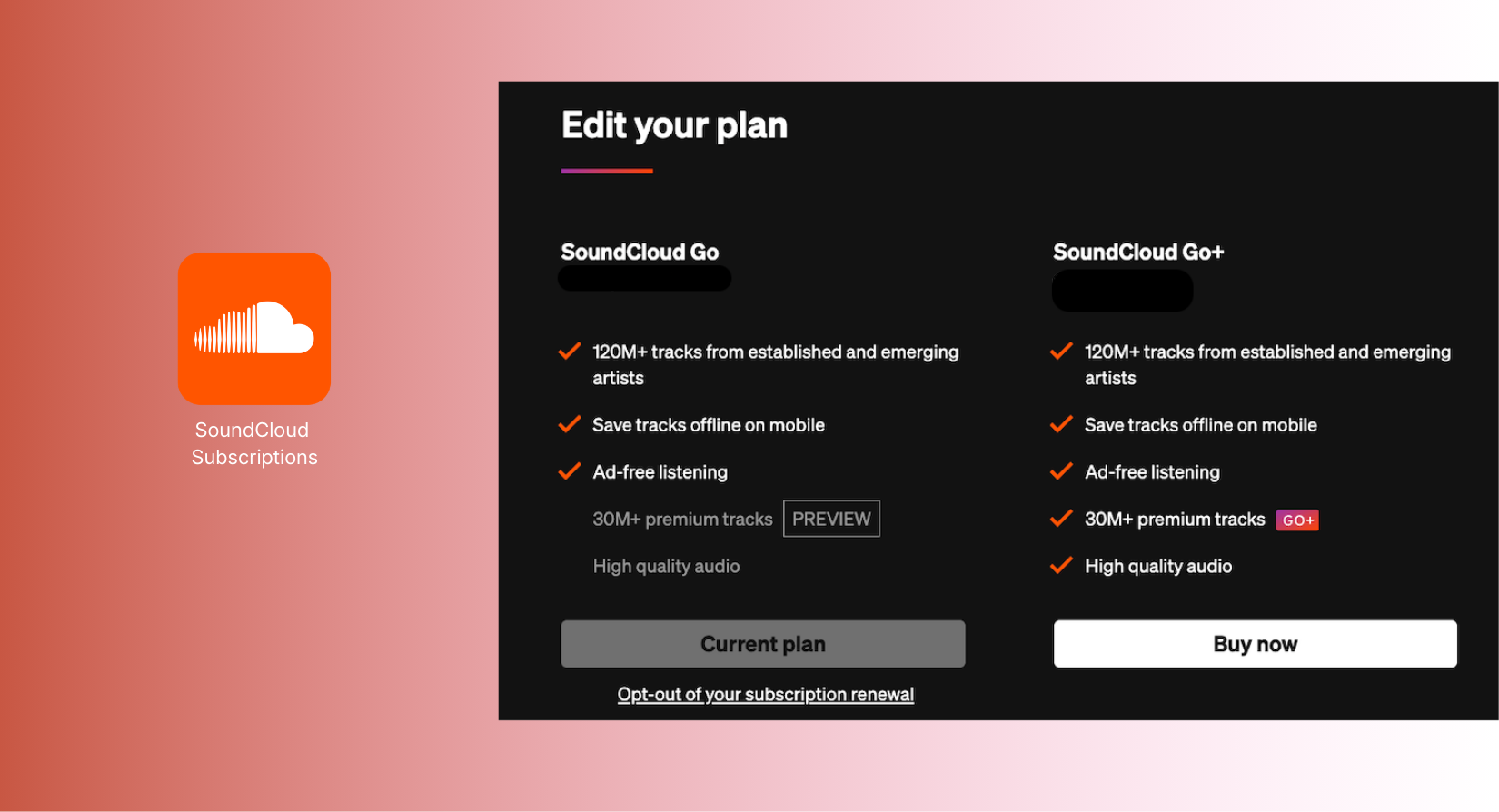
SoundCloud Subscription Plans
The official way to remove ads from SoundCloud is to subscribe to SoundCloud Go or Go+.
What you get:
- Completely ad-free listening
- Offline downloads
- Higher audio quality
If you want zero ads on mobile without technical fixes, this is the smoothest path. Supporting SoundCloud this way also keeps artists paid — unlike bypassing ads entirely.
SoundCloud Ad Blocker for Android
The SoundCloud app for Android is packed with ads, and browser extensions don’t work in apps. That’s where system-wide mobile ad blockers come in.
A great place to start is to install an ad blocker on your Android.
These tools can block:
- in-app audio ads
- trackers
- pop-ups across other apps
Other methods that sometimes work:
- DNS ad blocking
- Third-party browsers with built-in AdBlock
- VPNs with ad-blocking capabilities
Just avoid sketchy VPNs or unknown APK ad blockers — they often sell your data (ironically).
How to Remove SoundCloud Ads on Windows and macOS
If you use the SoundCloud desktop app, you will notice the ads feel even more aggressive. Here’s how to block them:
1. Install a system-wide ad blocker
Blocks ads across:
- browsers
- desktop apps
- pop-ups
- trackers
2. Use DNS-based filtering
Easy and safe. Switch your DNS to a blocking provider, and most SoundCloud scripts go silent.
3. Use a VPN with built-in adblocking
A VPN can block SoundCloud ads by:
- hiding your location (lower ad volume)
- filtering scripts
- disabling ad networks
This also affects how many ads you get across other platforms, like Hulu (see our Hulu adblocker guide).

How to Block Ads on SoundCloud iPhone and iPad
iOS restricts system-wide ad blocking, so your options are slightly different:
✔ Use a Safari content blocker
Blocks ads when you use SoundCloud in the browser.
✔ Use a VPN app with ad filtering
Filters audio ads, banner ads, and trackers.
✔ Subscribe to SoundCloud Go/Go+
Still the most complete solution for iPhone and iPad.
Note: iOS doesn’t allow blocking ads inside the official SoundCloud app via browser extensions. Only system-wide filters or VPNs help.
VPN Method: Change Location Settings to Reduce Ads
Some regions have way more SoundCloud ads than others. Using a VPN lets you:
- Change your location;
- Lower your ad volume.
- Block trackers;
- Avoid targeted ads.
While this doesn’t block 100% of ads, many users report seeing fewer audio ads when connected to countries with lighter ad networks.
A VPN also protects your privacy, which helps reduce tracker-based ads over time.
Which Ad Blocker SoundCloud Solution Is Right for You?
Here’s the quick breakdown:
| Goal | Best Method |
| Remove all ads instantly | SoundCloud Go/Go+ |
| Block ads on desktop | Browser ad blocker extension |
| Block SoundCloud ads on Android | Mobile ad blocker or DNS filtering |
| Reduce ads system-wide | VPN with ad filtering |
| Block most web ads | Stands AdBlocker |
| Hide your region / reduce targeting | VPN location change |
If you need the simplest solution possible, go with a Chrome ad blocker or a SoundCloud subscription. But of course, if you want a creative workaround, VPNs and DNS filtering also work well.
Frequently Asked Questions (FAQ)
Is blocking SoundCloud ads legal?
Yes. Using an ad blocker or a VPN to block SoundCloud ads is legal in most countries. Ad blockers stop ads from loading on your device. You are not hacking or changing the service.
That said, SoundCloud relies on ads to pay artists and keep the platform running. Using an ad blocker reduces this revenue. The official ad-free option is SoundCloud Go or Go+, which removes ads completely and supports the artists.
Many people still use ad blockers to avoid interruptions. Just remember, blocking ads means you are skipping the ads that fund the platform.
Will ad blockers affect sound quality?
No. Ad blockers do not change the audio stream. They only block scripts, banners, and video ads.
In fact, playback can be better. Fewer background scripts reduce strain on your device. Your music will sound the same, just without interruptions.
Can I download SoundCloud songs ad-free?
Yes, with SoundCloud Go or Go+. You can download songs for offline listening. Tracks play without audio ads. This is useful for commuting, traveling, or slow internet. Avoid unofficial download tools — they may violate SoundCloud’s terms. The safest way is through SoundCloud Go or Go+.

