
 Home »
How to Mute Words on Instagram: Complete Guide to Blocking Unwanted Content
Looking for the most effective ways to protect your Instagram account from inappropriate content? In this article, you will get to know how to make your Instagram experience safe by blocking words on the platform.
- Why You Need to Mute Words on Instagram
- Step-by-Step Guide: How to Block Words on Instagram
- Can You Mute Words on Instagram Stories and Reels?
- Advanced Settings: How to Block Keywords on Instagram Automatically
- StandsApp.org: The Ultimate Tool for Enhanced Instagram Content Control
- Real-Life Scenarios: When to Block Words on Instagram
- Common Mistakes to Avoid When Muting Words on Instagram
- Expert Tips for Effective Word Filtering on Instagram
- FAQ: Mute Words on Instagram
Why You Need to Mute Words on Instagram
Muting words on Instagram allows you to hide posts, stories, or even private messaging on Instagram while you continue to follow the account. A user of Instagram can mute somebody’s comments and direct messages in multiple ways to limit their interactions with them. While muting some words on Instagram, you will be able to manage your content in the most efficient way.
Understanding Instagram's Word Filtering Features
Instagram’s word filtering features include:
- Automatic Filtering: mutes comments and DM requests that contain words from a general list of offensive terms or your custom additions.
- Custom Lists: allow adding specific words, phrases, or emojis (for spoilers, spam, or specific triggers).
- Threads Integration: Offers separate, timed controls for filtering content, enabling users to hide topics like TV show spoilers temporarily.
- On-Device Processing: You can permanently delete your Instagram account messages on your device, protecting your privacy.
Benefits of Blocking Words on Instagram
Among the most essential benefits, we can emphasize:
- Content Management: You can manage your feed and direct messages by filtering out spoilers, political arguments, and other triggers.
- Proactive Safety: Automatically hides harmful content, preventing it from reaching you in comments, story replies, and direct message requests.
- Protection from Abuse: Protects you from scams, spam, and offensive words, especially from strangers. You can filter them into a separate folder.
- Enhanced Focus: You can keep your notifications and comments section cleaner, enabling you to focus on meaningful content and positive interactions.
- Improved Mental Well-being: Reduces exposure to harassment, bullying, and negativity, leading to less anxiety and a more enjoyable browsing experience.
Step-by-Step Guide: How to Block Words on Instagram
Let’s consider diverse methods how to mute words on Instagram.
Method 1: Blocking Words in Comments
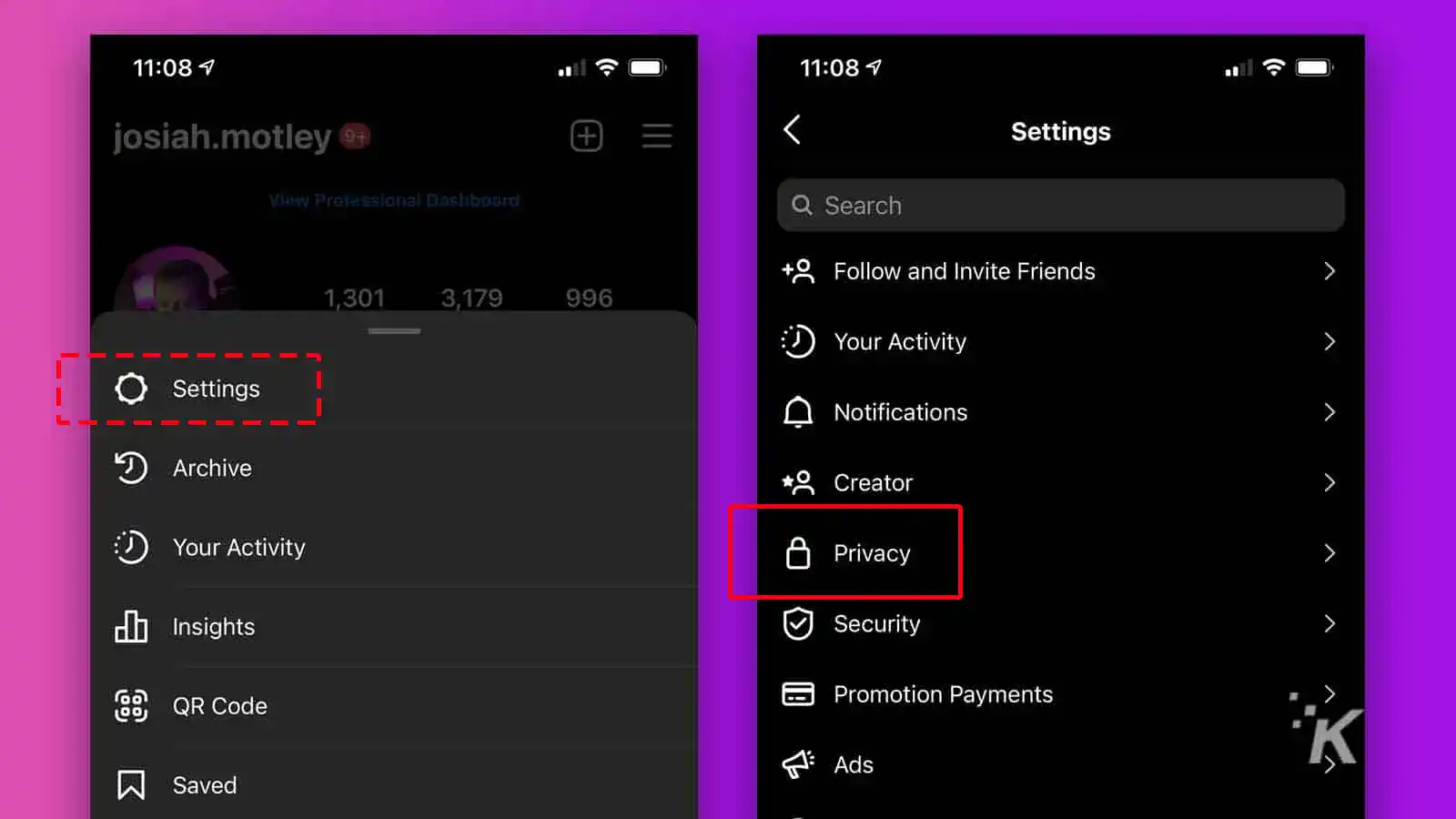
To block words in comments, follow these steps:
- Go to “Settings”;
- Go to “Privacy”;
- Choose comments;
- Use “Custom words” to filter comments automatically.
Method 2: Blocking Words in Direct Messages
To block words in direct messages, follow these steps:
- Go to “Settings”;
- Go to “Privacy”;
- Turn on “Hide message” request;
- Tap “Custom words” and phrases and add the words and phrases you want to mute.
Method 3: Using Instagram's Hidden Words Feature
Using Instagram's hidden words feature, you can hide direct messages and comments with forbidden words and phrases at the same time.
To block words in comments and direct messages, you need to follow this step-by-step guide:
- Then go to “settings”;
- Then choose “Privacy”;
- Find the “Interactions” department;
- Scroll down to “Custom words for messages and comments”
- Add custom words and phrases — add words and phrases you would like to include;
- Activate hiding features — hide comments and direct messages with forbidden words.
Can You Mute Words on Instagram Stories and Reels?
You can mute specific words on Instagram Stories by using the "Hidden Words" feature in your Privacy settings to filter comments and message requests. Moreover, you can add specific words or phrases in "Content Preferences" to reduce scrolling unwanted suggested content, though direct blocking on Stories themselves is managed through these settings.
How to Block Certain Words on Instagram Stories
You can’t directly mute words in Stories. However, you can hide comments with certain words on your posts and mute content by using Content Preferences or Hidden Words settings on Instagram.
Filtering Keywords in Reels Comments
To filter keywords in Reel Comments, you need to follow these steps:
- Go to “settings”;
- Go to “Privacy”;
- Add words and phrases to mute comments and message requests with specific words;
- Check Settings > Content Preferences > Specific words and phrases to hide suggested posts/Reels containing those terms.
Advanced Settings: How to Block Keywords on Instagram Automatically
Users of the platform can automatically block keywords by applying the built-in Hidden words feature in the Privacy settings to mute comments and messages with unwanted words. Also, they can do this in another way by using the Specific Words and Phrases tool under Content Preferences to mute posts with forbidden words.
Enabling Automatic Filtering
The platform’s system automatically filters common offensive words, but you can add your own words to have better control.
Managing Your Blocked Words List
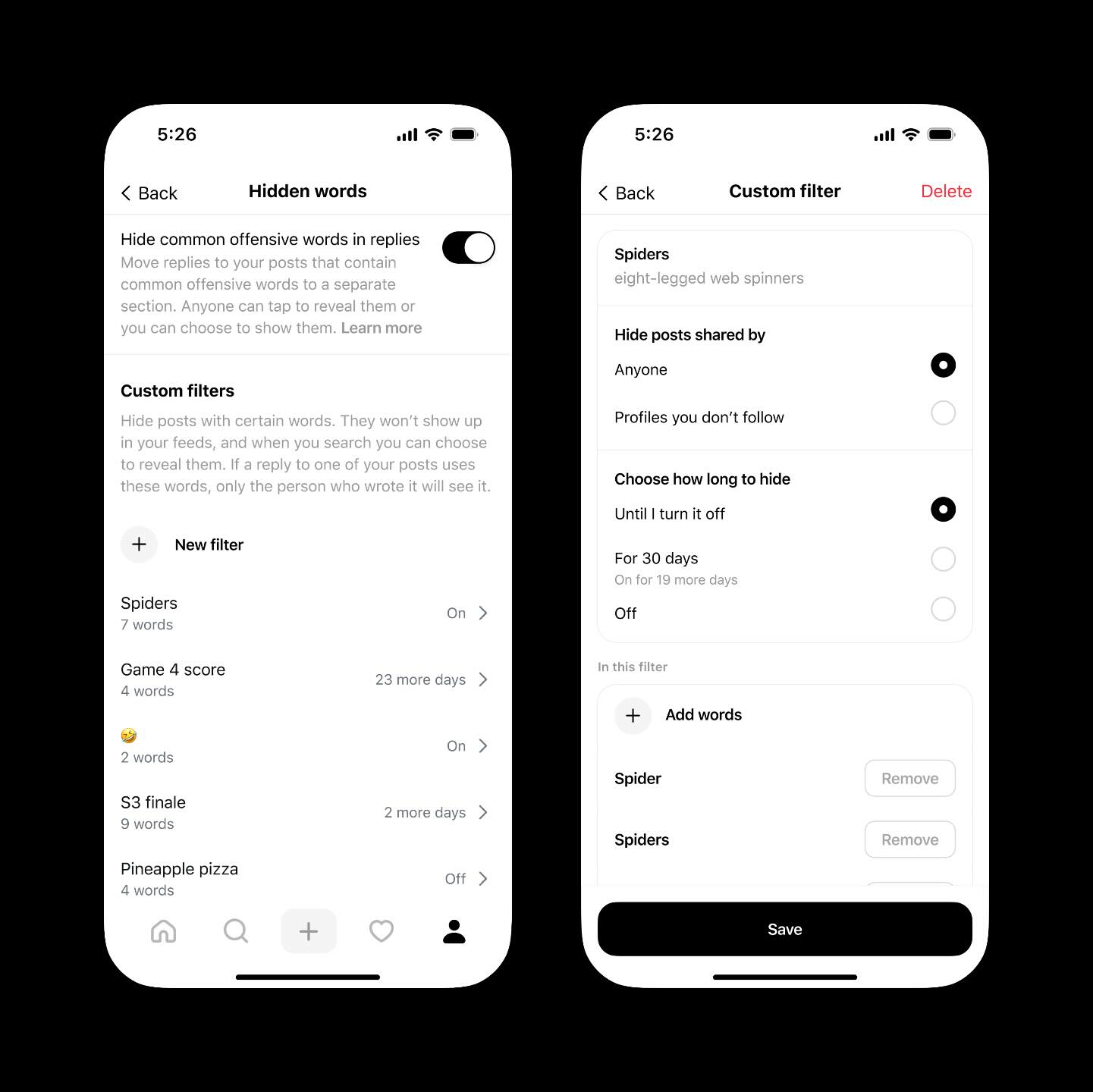
Go to the “Hidden Words” section and manage custom words and settings. For this, enter words, phrases, numbers, or emojis you want to hide, and separate them by commas. After that, tap “Add”.
Updating and Removing Muted Words
If you want to remove a word, you need a word, phrase, or emoji from hidden words, tap Delete next to the word, phrase, or emoji that you want to delete.
StandsApp.org: The Ultimate Tool for Enhanced Instagram Content Control
StandsApp is the ultimate tool for enhanced Instagram content control because you can manage content on the platform in the most effective way.
Why Choose StandsApp for Instagram Management
StandsApp is a top-grade Chrome adblocker for faster and cleaner browsing and a dedicated, all-in-one Instagram management platform, allowing you to block inappropriate content. Looking for the best viewing experience on Instagram? Then pay attention to StandsApp. It allows blocking ads and pop-ups.
While using Stands AdBlocker for Instagram management, you will:
- Enhance your experience on the platform by reducing the impact of Instagram ads;
- Improve your focus — less clutter helps you focus on the content from accounts you follow.
Real-Life Scenarios: When to Block Words on Instagram
When you have doubts about blocking words on the app or not, let’s consider the essential benefits of blocking inappropriate content on social media, including Instagram.
Protecting Your Mental Health
Blocking unwanted words on social media is very useful to protect your mental health reliably. You can filter out triggering words related to body shaming, eating disorders, harassment, politics, or other stressful topics. This will protect you from unwanted comments and harmful discussions. As a result, you can enjoy the app experience without unnecessary emotional strain. Over time, you will get better focus, mood, and Instagram well-being.
Avoiding Spoilers and Sensitive Topics
You can also use word blocking to avoid spoilers and sensitive content. If you follow entertainment content, keywords can prevent unwanted spoilers from appearing in comments or captions. Additionally, users can mute words related to sensitive topics, including violence, illness, or tragic events, providing you with more control over what you see.
Reducing Spam and Unwanted Promotions
A lot of users block words to reduce spam and aggressive promotions. Hiding terms used in scams, giveaways, crypto promotions, or fake discounts helps you keep comment sections and messages relevant and trustworthy. It helps you engage with better content and conversations while decreasing distractions from advertisers, bots, and irrelevant marketing posts.
Common Mistakes to Avoid When Muting Words on Instagram
There are several common mistakes made by users when muting words on Instagram.
Over-Filtering Your Content
One of the most popular mistakes that users make when filtering content is entering too many words at once. Over-filtering can also mute useful, interesting, or positive posts. This is essential when you try to hide commonly used words. This can cause you to miss updates from people you follow. If you want to avoid this experience, you should start with a targeted group of words and phrases.
Forgetting to Update Your Blocked Words List
Another of the most popular mistakes is setting up muted words once and never updating them. Language, trends, and personal preferences can change over time. Therefore, an outdated blocked words list may no longer serve your requirements. Some muted words or phrases can become irrelevant. At the same time, new triggers and spam phrases can appear. If you regularly review and update your blocked words, your Instagram feed can stay relevant and balanced.
Expert Tips for Effective Word Filtering on Instagram
We have prepared expert tips to help you filter words on the app effectively.
Best Practices for Creating Your Block List
Start by determining specific words or phrases that trigger negative emotions, spoil content, or attract spam. Focus on precise terms rather than widespread keywords to avoid muting valuable posts. It’s very important to update your blocked list periodically. You should delete words that no longer bother you and add new ones as trends or personal preferences change.
Combining Multiple Filtering Methods
Word filtering is more effective when combined with other Instagram tools. While blocking keywords, think of muting and blocking accounts on Instagram, limiting users who can comment on your posts, and applying Instagram’s “Hidden Words” feature to filter offensive language automatically. Using multiple filtering methods simultaneously builds a layered approach, providing you with stronger control over your feed while maintaining a healthy, engaging Instagram experience.
FAQ: Mute Words on Instagram
How many words can you block on Instagram?
It allows you to block up to 1,000 words and phrases altogether.
Will blocked users know if you mute their words?
No, they won’t get to know about this.
Can you mute words on Instagram for specific accounts only?
It does not allow you to mute words for specific accounts only.
Do muted words affect Instagram algorithm recommendations?
Muted words don’t directly affect the app’s algorithmic ranking or recommendations, but they impact what you see, which can indirectly create future recommendations.
How to export or back up your blocked words list?
Now, Instagram doesn`t offer a built-in way to export or back up your muted words list.

