
 Home »
Does Brave Browser Still Block YouTube Ads in 2026?
If you also switch to Brave, expecting YoutTube without ads, I completely get this expectation. People are usually right about Brave’s privacy strengths, but being mostly right doesn't stop ads from ruining your video queue. The big question is: does brave browser block youtube ads reliably right now?
The answer depends entirely on how quickly Brave's internal filters adapt to daily platform changes. I spent the last few weeks testing this setup across my own desktop and mobile devices. My goal was simple: figure out why built-in shields lag behind and how you can get a truly uninterrupted stream. Let's see what I discovered! :)
- Brave Browser Ecosystem
- Why Brave Shields Fail on YouTube (The 2026 Reality)
- Method 1: Force-Updating Your Brave Components
- Method 2: Enabling "Aggressive" Shield Settings
- Method 3: Adding Stands Adblocker as a Safety Net
- Direct Comparison: Brave Native vs. Brave + Stands Adblocker
- Mobile Solutions: Blocking Ads on Android & iOS
- FAQ: Brave YouTube Adblock Troubleshooting
- The Optimal Privacy Stack for 2026
Brave Browser Ecosystem
Brave uses its own native blocking system called Brave Shields. At the same time, traditional browsers rely on third-party extensions.
Honestly, I was impressed when I first checked how Brave works with network traffic. The browser's blocking core is written in Rust, which means it processes network requests at lightning speed. It keeps overall browser resource usage remarkably low while stopping cross-site trackers and traditional banner ads effortlessly.
The trouble starts when you navigate to dedicated streaming platforms like YouTube. Here, ads are no longer simple static banners served from a separate server. They are dynamic and integrated directly into the media playback pipeline.
Why Brave Shields Fail on YouTube (The 2026 Reality)
YouTube is where most users run into frustrating roadblocks. When you notice brave shields not blocking youtube ads, it doesn't mean your browser is broken or that Brave has given up on privacy. It simply means YouTube updated its delivery code faster than Brave could push out a filter update.

Over the past year, platform engineers have intensified their YouTube anti-adblock crackdown, treating ad blocking as a constant game of cat-and-mouse. When I examined why these commercials manage to slip past Brave’s shields, three main technical factors stood out:
1. The Server-Side Ad Insertion Factor (SSAI)
In the past, websites used CLIENT-side ad insertion. That means that they were loading the main video from one server and the commercial from another. Standard privacy filters could easily identify and block that external ad domain.
Today, YouTube uses SERVER-side ad insertion (SSAI). That means that its servers put the advertisement directly into the main m3u8 stream. To your browser, the commercial and the actual video look like the exact same file, because the ad data is baked into the media stream, a simple network blocker cannot tell where the ad ends, and your video begins.
2. Component Update Lag
Brave relies on micro-components to update its filtering rules without forcing you to update your entire browser software every day. This architecture is great for system stability, but it creates a timing bottleneck.
YouTube often alters its player scripts in minutes. Meanwhile, Brave's maintainers must detect the change, write a counter-rule, test it, and deploy it to their global network. This process usually takes 24 to 48 hours, and during that window, your browser uses yesterday's rules against today's ad scripts, that allows mid-rolls to leak through.

3. Manifest V3 Impact
Google’s industry-wide push toward Manifest V3 compatibility changed how web extensions interact with browser APIs. Even though Brave modified its core engine to preserve native blocking APIs, YouTube leverages these new browser standards to hide its internal player scripts behind complex obfuscation layers that are much harder for general privacy shields to parse.
Method 1: Force-Updating Your Brave Components
When asking why am i seeing ads on youtube brave, the most common culprit is simply an outdated rule list sitting in your local memory. Updating your internal components manually forces Brave to grab the latest network rules immediately.
Here is the step-by-step walkthrough I use whenever an ad appears on my screen:
- Launch Brave and type brave://components into the top address bar, then press Enter.
- Scroll down the list until you locate Brave Ad Block Resources.
- Watch the status text change to "Component updated."
- Once complete, refresh your YouTube page to see if the stream plays cleanly.
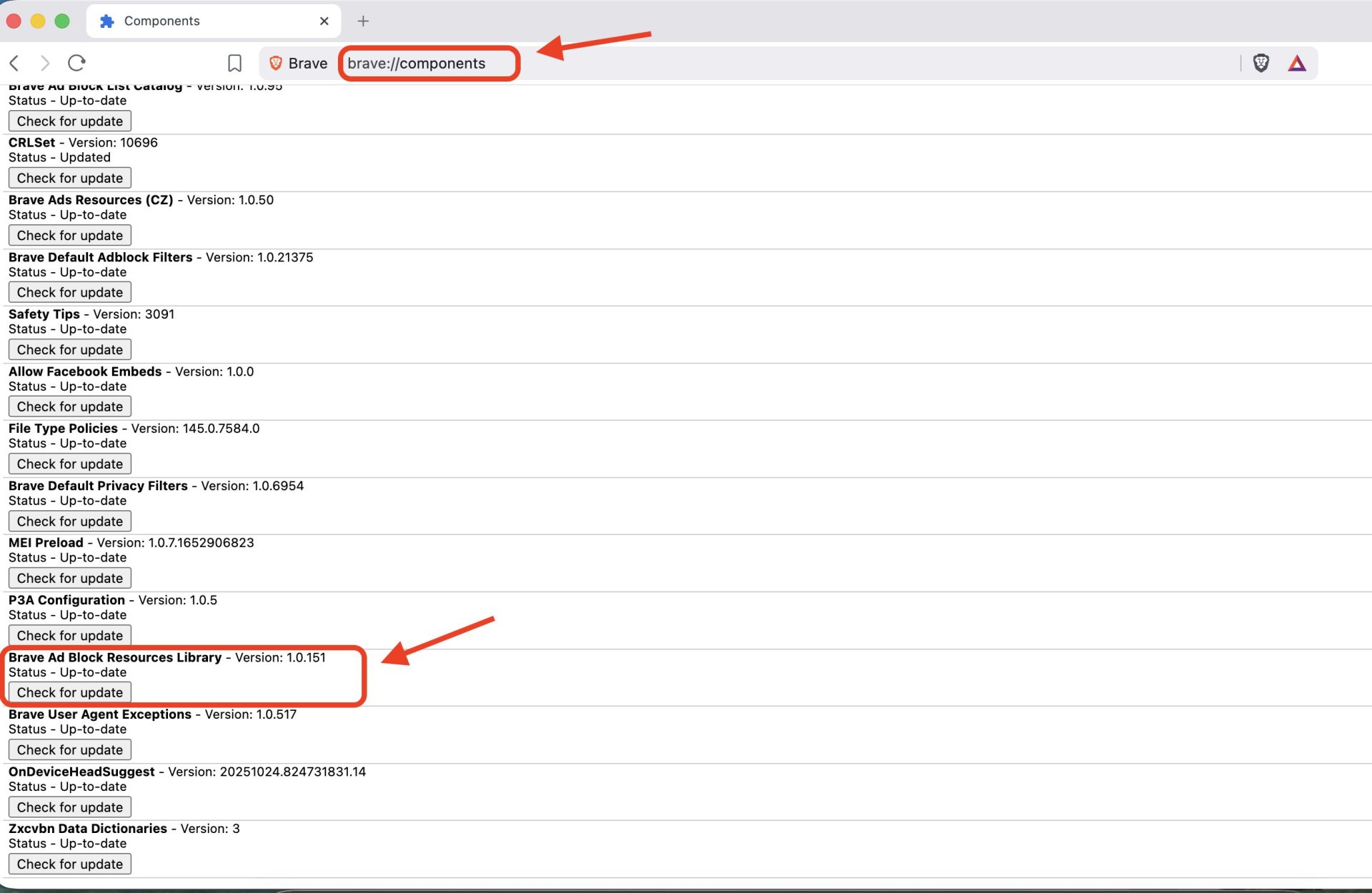
In most cases, this simple manual refresh pulls down the exact patch published by community maintainers over the last few hours, instantly restoring your ad-free playback.
Method 2: Enabling "Aggressive" Shield Settings
Out of the box, Brave configures its shields to "Standard" mode to ensure filter rules don't accidentally break user logins or video players on standard sites. However, if you want a dedicated brave youtube ad blocker experience, standard protection is often too permissive.
Here is how to optimize your built-in shield intensity:
- Locate Trackers & ads blocking and change the selection from Standard to Aggressive.
- Scroll down and click on Content Filtering.
- Check the boxes for Fanboy's Annoyance List and extra regional filter lists relevant to your location.
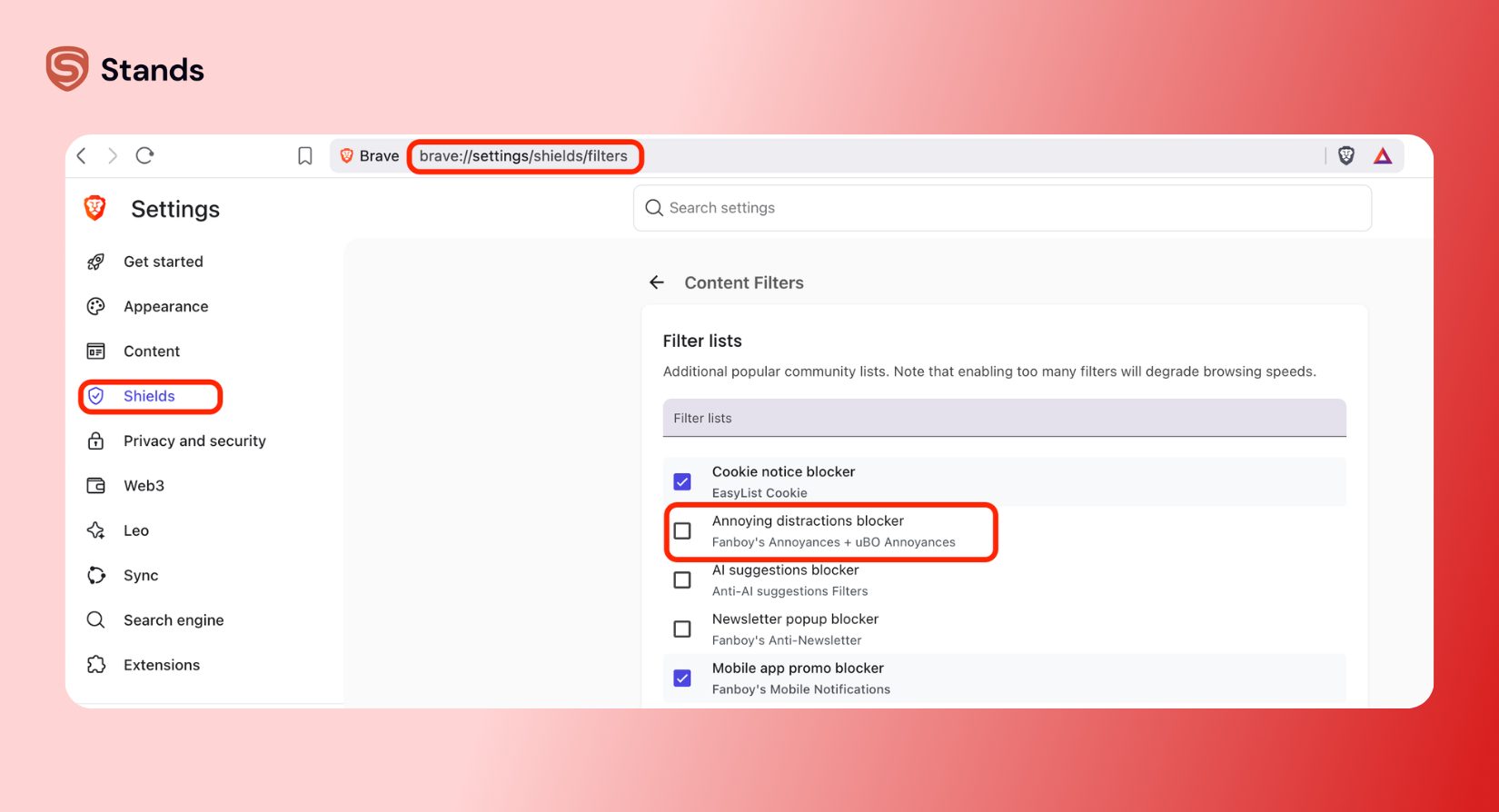
Switching to aggressive mode forces Brave to inspect incoming network packets much more strictly. It strips out hidden script tags before they can execute inside your video player. If a non-video website acts strange later, you can easily click the Brave Shield icon next to your address bar and toggle protection back to Standard for that single domain.
Method 3: Adding Stands Adblocker as a Safety Net
Native browser shields are great for baseline privacy, but, please, do not rely solely on a single filter list. This leaves you exposed during those 24-to-48-hour update gaps, when Brave's internal team is busy updating general browser code, and YouTube's automated scripts can easily bypass standard defenses.
This is why I strongly recommend implementing a dual-layer defense. Running a dedicated tool like Stands Adblocker alongside Brave gives you a high-speed, dynamic combination.
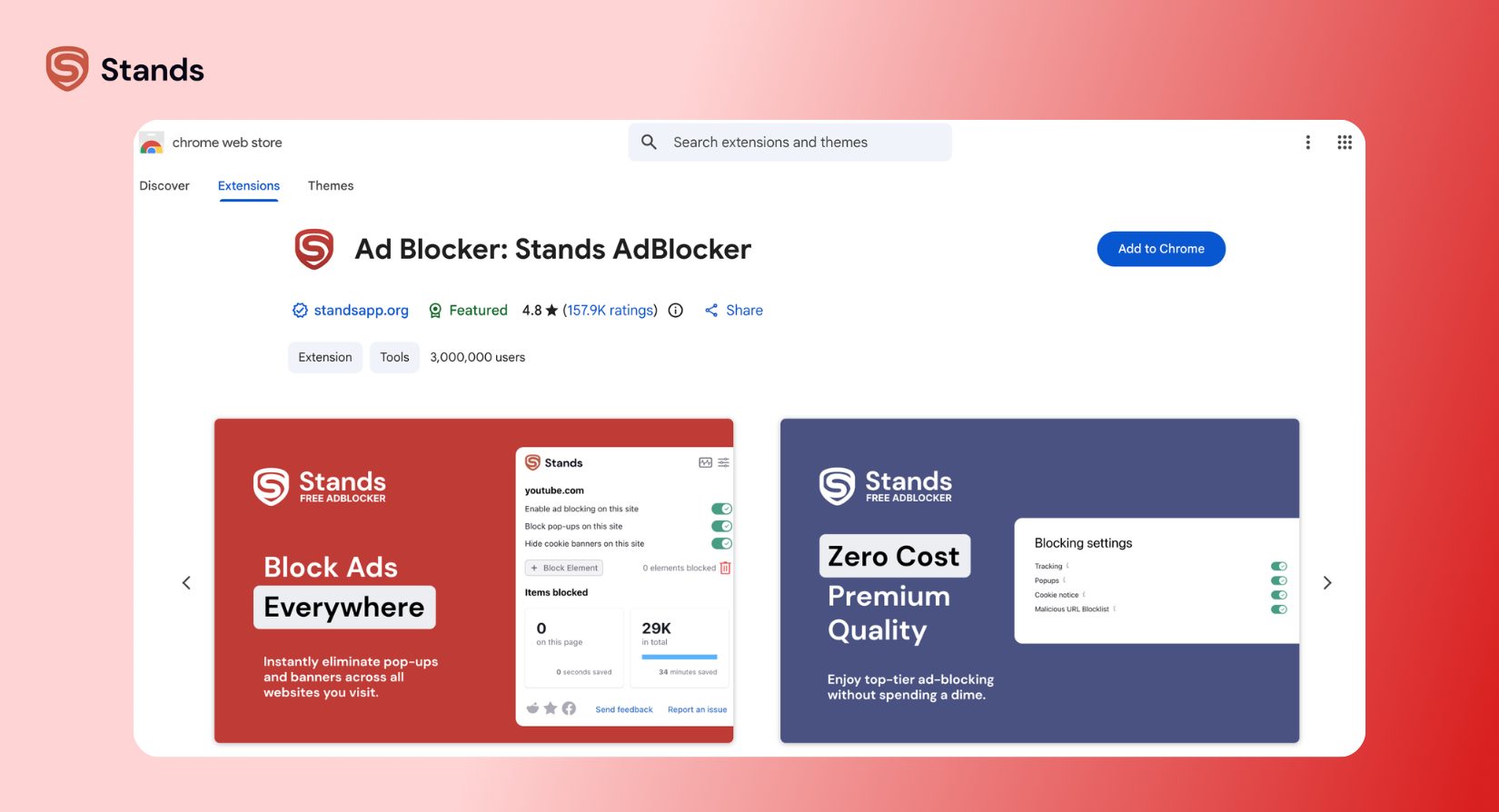
When Brave's general-purpose engine takes time to process new platform updates, Stands acts as a specialized filtering layer. It focuses specifically on real-time SSAI bypass and custom snippet injection. Instead of just blocking known ad domains at the network boundary, Stands monitors the internal page structure as it loads, neutralizing mid-roll triggers before the player can even request the commercial.
By pairing Brave with Stands:
- You bypass modern server-side ad insertion techniques that trick standard browser shields.
- You minimize the annoying black loading screens and infinite buffering pauses.
- You prevent the dreaded "Ad blockers violate YouTube's Terms of Service" pop-up warning from appearing.
If you want to expand your privacy setup beyond Brave, take a look at our guide on how to block ads in Chrome, check out our walkthrough for Twitch adblock fixes, or consult our complete YouTube ad blocker guide to clean up your streaming across all your devices.
Direct Comparison: Brave Native vs. Brave + Stands Adblocker
Finally, I wanted to compare a built-in browser protection (aka brave shield) with an ad blocker. I put their configurations side-by-side so you can easily see what each setup offers:
| Feature | Brave (Standard) | Brave (Aggressive) | Brave + Stands Adblocker |
| SSAI Bypass | Limited | Moderate | High (Real-Time Snippets) |
| Skip YouTube Pauses | Manual Refresh | Occasional | Automatic |
| Resource Usage | Very Low | Low | Low |
| Update Speed | 24–48 Hours | 12–24 Hours | Instant Cloud Sync |
| Purple Screen Twitch Protection | Low | Moderate | High |
| Search Engine Ad Removal | Partial | High | Complete |
| Price | Free | Free | Free |
As you can see from the breakdown above, while Brave on its own provides an incredible foundation, adding Stands creates an active defense system that handles complex video streams far more reliably.
Mobile Solutions: Blocking Ads on Android & iOS
The challenge of watching video content without interruptions isn't limited to desktop computers. If you are trying to figure out how to block youtube ads brave iphone or Android setups, the process requires a few specific adjustments within your mobile app settings.
Optimizing Brave for Android
Open the Brave app, go to Settings > Brave Shields & Privacy, and set Block Trackers & Ads to Aggressive. Make sure Block Pop-ups is enabled. If ads still appear, go to your phone's Settings > Apps > Brave > Storage, and tap Clear Cache to force the browser to re-download fresh rules.

Optimizing Brave for iOS (iPhone & iPad)
Open Brave on your iOS device, tap the three dots to open Settings, and select Brave Shields & Privacy. Toggle on Block Cross-Site Trackers and set the ad protection level to Aggressive.
Mobile apps provide decent baseline protection, but I would also recommend using specialized privacy tools on a desktop, as they still give you far more control over complex media playback.
FAQ: Brave YouTube Adblock Troubleshooting
Why am I getting the 'Ad blockers are not allowed' warning on Brave?
YouTube constantly updates its detection scripts to check whether core playback functions are being altered. When Brave's internal filter lists fall behind, YouTube detects the blocked network requests and flags your session with a pop-up warning until your local filters receive the newest counter-measure.
How to block YouTube ads on Brave Android effectively?
To stop ads on Android, open your app settings under Brave Shields & Privacy, set tracker blocking to Aggressive, and regularly clear your mobile cache. If video prerolls continue to break through, consider using a dedicated mobile privacy setup or accessing streams through an ad-free desktop browser layer.
Does Brave still work with YouTube in 2026?
Yes, brave browser youtube ads protection still works, but it requires regular maintenance. Because YouTube modifies its streaming architecture continuously, relying on default settings alone will occasionally lead to temporary disruptions. Running a dual-layer strategy with manual component updates or an added protection tool prevents these sudden breaks.
The Optimal Privacy Stack for 2026
From my own testing experience, expecting Brave to simultaneously serve as a lightweight browser, an anti-fingerprinting tool, and an instant video ad blocker is a high bar for any single app. Brave provides fantastic baseline privacy, but YouTube changes its ad technology far too rapidly for default lists alone.
To achieve a fast, quiet, and completely ad-free video experience, I recommend using this simple, proven setup:
- Brave Browser as your primary, privacy-focused foundation.
- Aggressive Shield Settings enabled within Brave to catch basic video ad scripts natively.
- Stands Adblocker running alongside your browser to remove complex SSAI ads, skip mid-rolls, and clear blank layout boxes.
- Manual Component Updates (brave://components) whenever platform scripts undergo major backend overhauls.
That's everything you need to know to fix playback issues on Brave! Don't wait around for default shields to catch up while you're trying to enjoy your favorite content. Head over to Stands to equip your browser with real-time video ad protection today.
If you would like to explore more technical details on how native blocking works, feel free to read Brave's official YouTube guide, check their ad-block updates post, join user discussions over on Reddit, or watch this helpful video walk-through. Hope this guide helped you! :)

