
 Home »
Tracking Cookies Explained: What They Are and How They Work
The internet feels fast and easy. You take your phone, go online, scroll, click, and everything works as it should. What you don't see there are cookies. They are stored in your browser every time you browse a website. Some of them are used for functionality. Others exist to measure performance or personalize your experience. And then there are tracking cookies, that are designed specifically to monitor your browsing behavior.
Tracking cookies are simple tools and are not mysterious or dangerous in any way. How they are used determines how much of your online activity is recorded, analyzed, or shared. Many people ask if cookies track you automatically, but it depends on how websites use them. In this article, we will check what tracking cookies are, what cookies can track, how cookies are used by websites to track you, and how you can manage or block them with browser settings and tools like Stands AdBlocker.
What Are Tracking Cookies?
Cookies are small pieces of data that help websites remember information about your visit. A tracking cookie, specifically, is a text file saved in your browser each time you access a website.
Many cookies are needed for websites to work, for example:
- A website remembering your language preference
- Keeping you logged in to your account
- Keeping items in a shopping cart
- Maintaining secure sessions
These are functional cookies.
Tracking cookies, also called tracker cookies, are made to collect information about your actions online. They track of how you use pages, what you look at, how long you stay, and sometimes what you come back to later.
A simple tracking cookie definition:
Tracking cookies are data files saved in your browser that check and analyze what you do online. And websites simply use tracking cookies for analytics, marketing, and targeted ads.
There are two primary types of web tracking cookies:
The last ones are often what people mean when they talk about “being tracked across the web” and ask whether cookies track users beyond a single website.

How Do Tracking Cookies Work?
Tracking cookies identify users by assigning them an ID, rather than watching them directly. This is the technical basis of how cookies track users over time.
Here’s how the process works:
Step 1: Website sends a cookie
Whenever you open a website, it stores a small text file in your browser. This file contains some information that helps the website recognize your browser and remember your activity. Simple as that is how cookies are used by websites to track you. It may include:
- A name
- A value (ID)
- An expiration date
- A domain and path
Step 2: Browser stores the cookie
Your browser saves the cookie on your device and links it to the website that created it.
Step 3: Cookie is sent back on future requests
When you go back to the same website, your browser automatically sends the cookie to the server. This helps the website recognize your browser when you come back.
Step 4: Behavior assigned to identifier (ID)
When a cookie has its own special number, the website can link what you do and which pages you visit to that number. This is how cookies follow users and keep a record of what they do.
It’s important to understand that cookies don't actually track your activity on their own. Cookies store IDs, and the website’s system connects your actions to those IDs.
How does third-party tracking work ?
Third-party tracking is when a website uses services from outside companies. The latter are usually ad networks, analytics tools, or social media plugins.
When the page loads, your browser connects to these outside companies and the website you want to visit. The outside company can then put its own cookie on your device. This cookie has a special code tied to you.
If you visit another website that uses the same company, your browser sends that cookie again. Since the code stays the same, the outside company can connect your activity across different websites that use its services. This is a common way websites use cookies to track you across sites.
What Information Can Cookies Track About You?
Tracking cookies save data that helps analyze your behavior. They don’t store your full browsing history inside the cookie. Instead, they usually store an identifier. The tracking system then logs your activity linked to that identifier.
When people ask what cookies track, the answer usually includes behavioral signals such as:
- Pages visited on a site
- Time spent on pages
- Click behavior
- Products viewed
- Referring website
- Approximate geographic region (derived from IP address during server processing)
- Browser and device type
Cookies usually only store a small identifier. Detailed records of your activity are stored on the website’s servers.
Do cookies track you personally ?
No. Most of the time, tracking cookies only store anonymous identifiers. However, if you log in to an account and the website links it to that identifier, your browsing activity can be linked to your profile in that system.
Types of Tracking Cookies
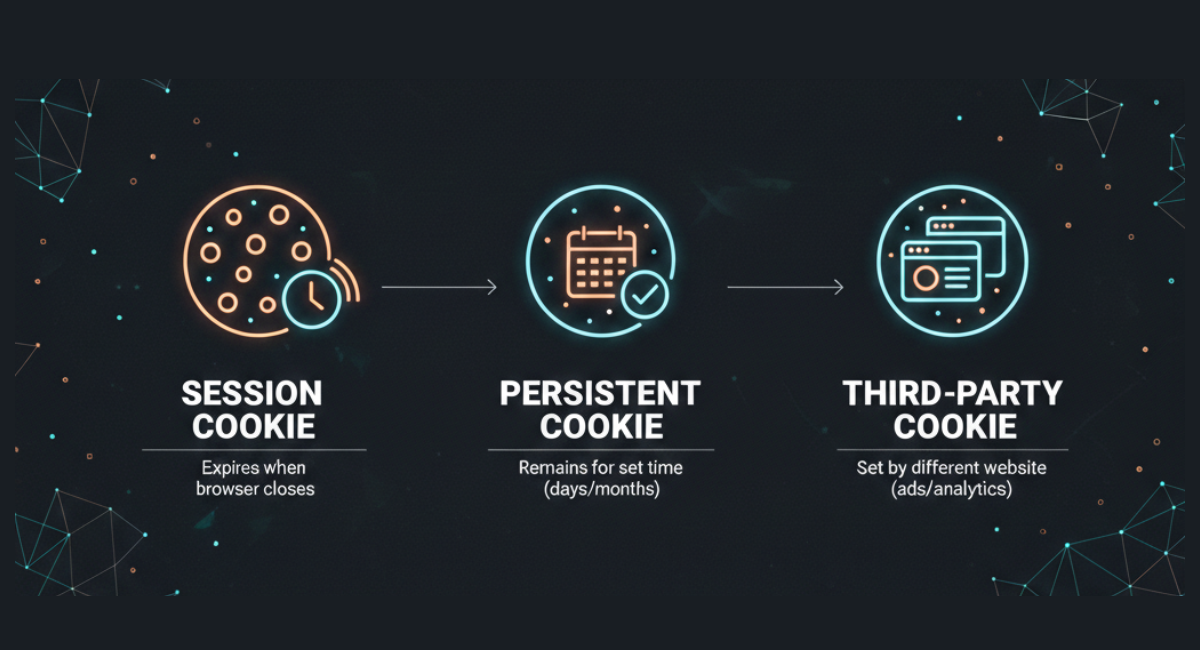
Tracking cookies are generally divided into three groups, and it is based on how long they remain on your computer and who creates them.
Session cookies are the most common type. These function similarly to short-term memory, and they only stay while the browser is open. They are mainly used to keep user authentication on pages or to save information entered into forms. Once the browser is closed, session cookies are deleted automatically. Due to their short lifetimes, they are not used to track user behavior over longer periods.
However, persistent cookies are stored in the browser for a predetermined period, and they are not deleted when you leave a website. Their main function is to recognize returning users, and they do that by identifying their devices. These help companies to monitor visit frequency and analyze user interactions over time. Persistent cookies are widely used in advertising and data analytics.
Are Tracking Cookies Dangerous?
The short answer is no. Tracking cookies are not malware.
They can’t:
- Install software
- Execute code
- Access local files
- Spread viruses
They mostly affect your privacy, not the security of your device.
The main privacy considerations include:
- Long-term behavioral profiling
- Cross-site activity recognition
- Data sharing between advertising or analytics platforms
A cookie file is just a way to store data. Privacy concerns come from how that data is used and shared.
How to Manage and Block Tracking Cookies
There are several ways you can control tracking cookies.
Adjust browser settings
Most browsers allow you to:
Blocking third-party cookies reduces cross-site tracking, but it might affect how some website features work.
Use privacy tools
Browser extensions can stop tracking scripts from loading or block cookies from being set.
For example:
- On mobile devices, an Ad Blocker for Android can limit exposure to mobile tracking.
Stands AdBlocker combines several of these protections into one tool.

Clear cookies regularly
Manually clearing cookies removes stored identifiers from your browser.
After clearing cookies:
- Persistent tracking identifiers are deleted.
- Websites may treat you as a new visitor.
- Your personalized settings may reset.
However, clearing cookies does not stop new ones from being created when you visit websites again..
Unique Uses and Future Trends for Tracking Cookies
For a long time, tracker cookies have been the main tool for online ads, following what people do online and changing what you see. They help businesses see how people use their websites so they can improve them. People worry more about online privacy and new browser rules come in, the focus is moving from following people everywhere online. Now, companies are choosing more privacy-friendly ways that gather less extra data.
Browser restrictions
Most major web browsers are now making it harder for companies to follow you. They are doing this by limiting or completely removing support for third-party cookies, which effectively cuts down on cross-site tracking.
Increased focus on first-party data
Tracking people across different websites is more difficult, companies are now paying more attention to first-party cookies. How do they get them? They come directly from the website you visit, not from outside advertisers.
Stronger privacy regulations
Global privacy laws like GDPR and CCPA have changed the rules. Websites are now legally required to be transparent about what they do and must get your clear consent before using many types of cookie tracking.
Alternative measurement systems
As third-party cookies disappear, tech companies are inventing new ways to measure how people interact with ads and websites. These new systems are designed to provide the data businesses need while doing a better job of protecting your individual privacy.
Conclusion
Tracking cookies are still an important part of the internet and marketing tools. They help websites check how many people use their sites, and they also give you a more personal experience. With one uncomfortable moment - they let companies follow what you do online. But now, as you know what cookies do and how they work, you can better control what information you share online. If you want more privacy, you can change your browser settings or use tools like Stands AdBlocker to limit tracking :)
FAQ
Can tracking cookies identify me personally?
Most tracking cookies only save a random ID for your browser, not your name or email. But if you log in to a website, that site can connect the ID to your personal profile.
How do I remove tracking cookies from my browser?
You can clear them out by going into your browser settings and deleting your history or cache. You can also block third-party cookies entirely or use privacy tools like Stands AdBlocker to stop them from being saved in the first place.
Are all cookies used for tracking?
No. Many cookies are strictly necessary for a website to work properly, handle security, or remember your preferences (like your language settings). Only specific "tracker cookies" are designed to watch and measure what you do online :)
Do tracking cookies slow down my device?
The cookie files themselves are tiny and won't slow down your computer or phone.
Is blocking tracking cookies enough for privacy?

