
 Home »
How to Delete Telegram Account Permanently: 2026 Quick Link Guide
Looking to remove your Telegram account for good? Whether you're tidying up your digital footprint or switching to a fresh new messaging app, wiping your data is super simple and takes just a few clicks! :)
How to delete a Telegram account permanently: You can delete your account instantly using the official Telegram deactivation link (my.telegram.org) in any web browser. Alternatively, you can set the handy in-app self-destruct timer to automatically wipe your account after 1 to 18 months of inactivity :)
Before You Delete Telegram
There's something I want you to know before you delete the account:
- Deletion is completely irreversible. Once your account is gone, it’s gone for good!
- All cloud chats, messages, and contacts will be erased. If you'd like to save your memories or chat logs, be sure to export data before starting.
- Group and channel ownership will change. You will lose any channels or groups you created. Their main owner will be lost (unless you assign a new admin first).
IMPORTANT: The fact that you deleted the Telegram app from your phone or computer does NOT mean you also delete your Telegram account. Your chats and profile will stick around on Telegram's servers until you trigger the deactivation process or hit your inactivity limit :)

3 Ways to Delete Your Telegram Account in 2026
Immediate deletion via web browser (recommended)
If you'd like to wipe your account right away, using Telegram's web portal is the quickest way to go!
Official Telegram deactivation page:
Direct Portal: https://my.telegram.org/auth?to=delete
→ Open the Telegram deactivation page (my.telegram.org).
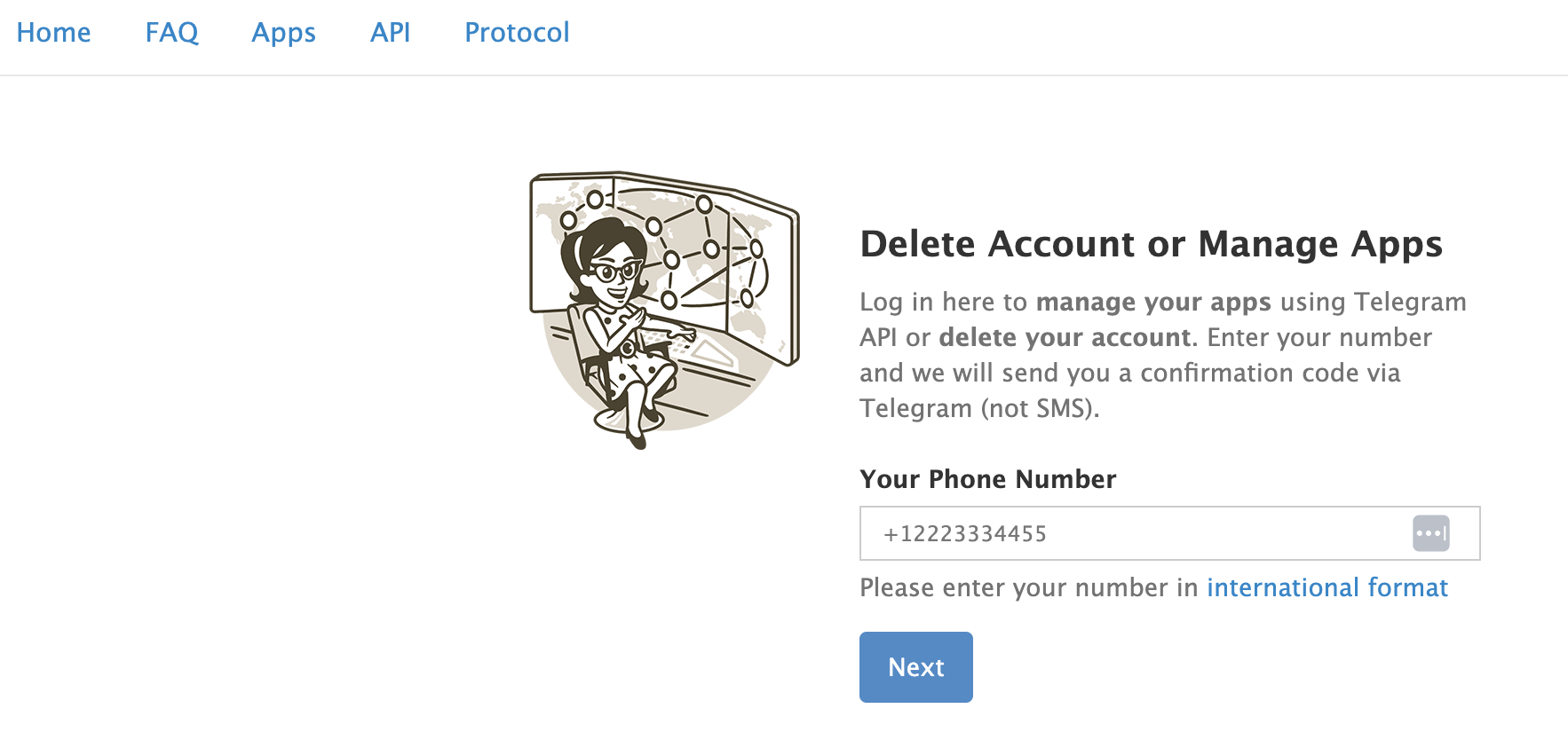
→ Enter your phone number with your country code (like +1 for US/Canada).
→ Open your Telegram app to get your code. Telegram sends it as an in-app chat message, not a text.
→ Copy the code, paste it on the website, and click Sign In.
→ Click Delete Account, add a reason if you want, and click Delete My Account.
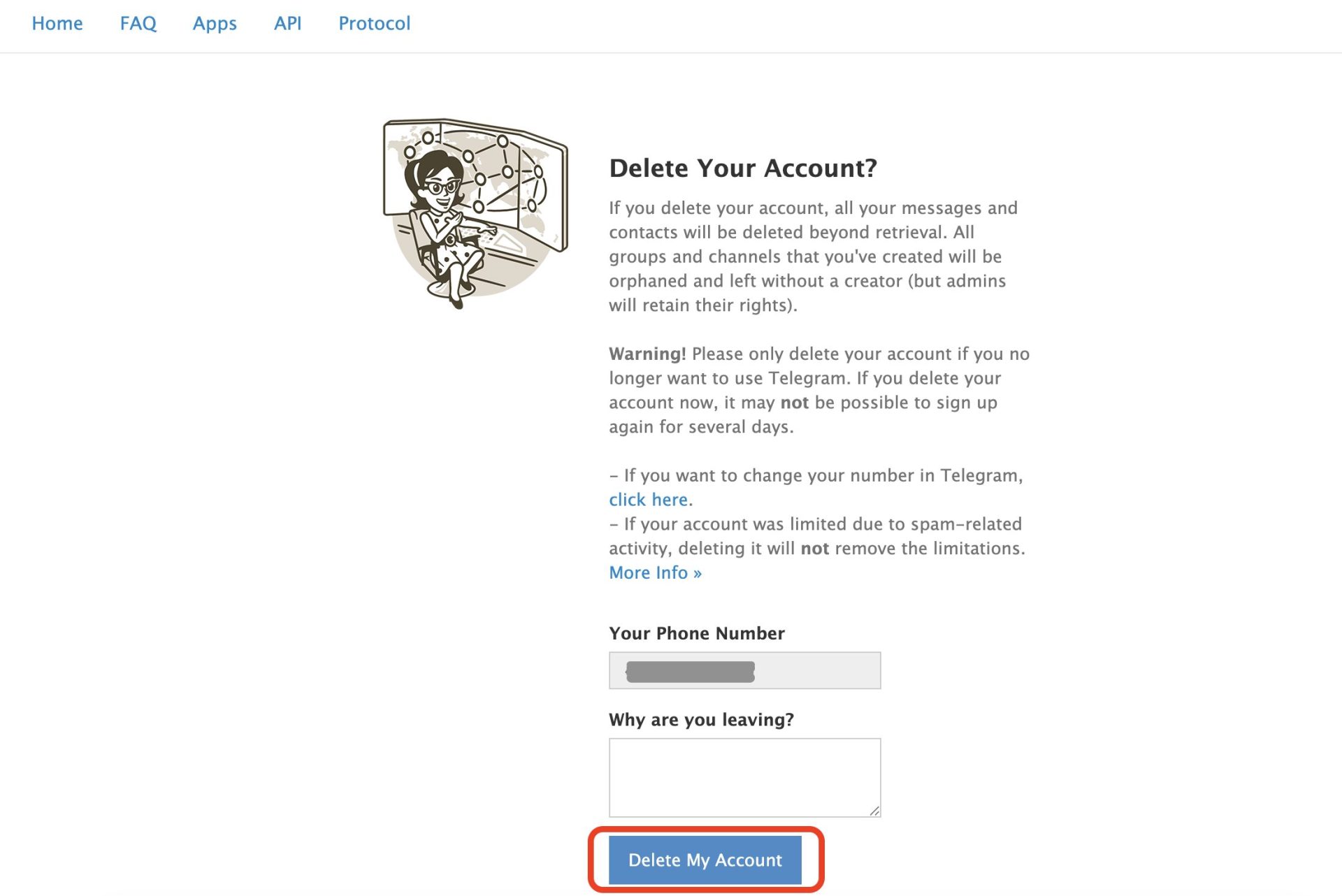
→ Confirm by clicking Yes, delete my account :)
Using the self-destruct timer (Android & iPhone)
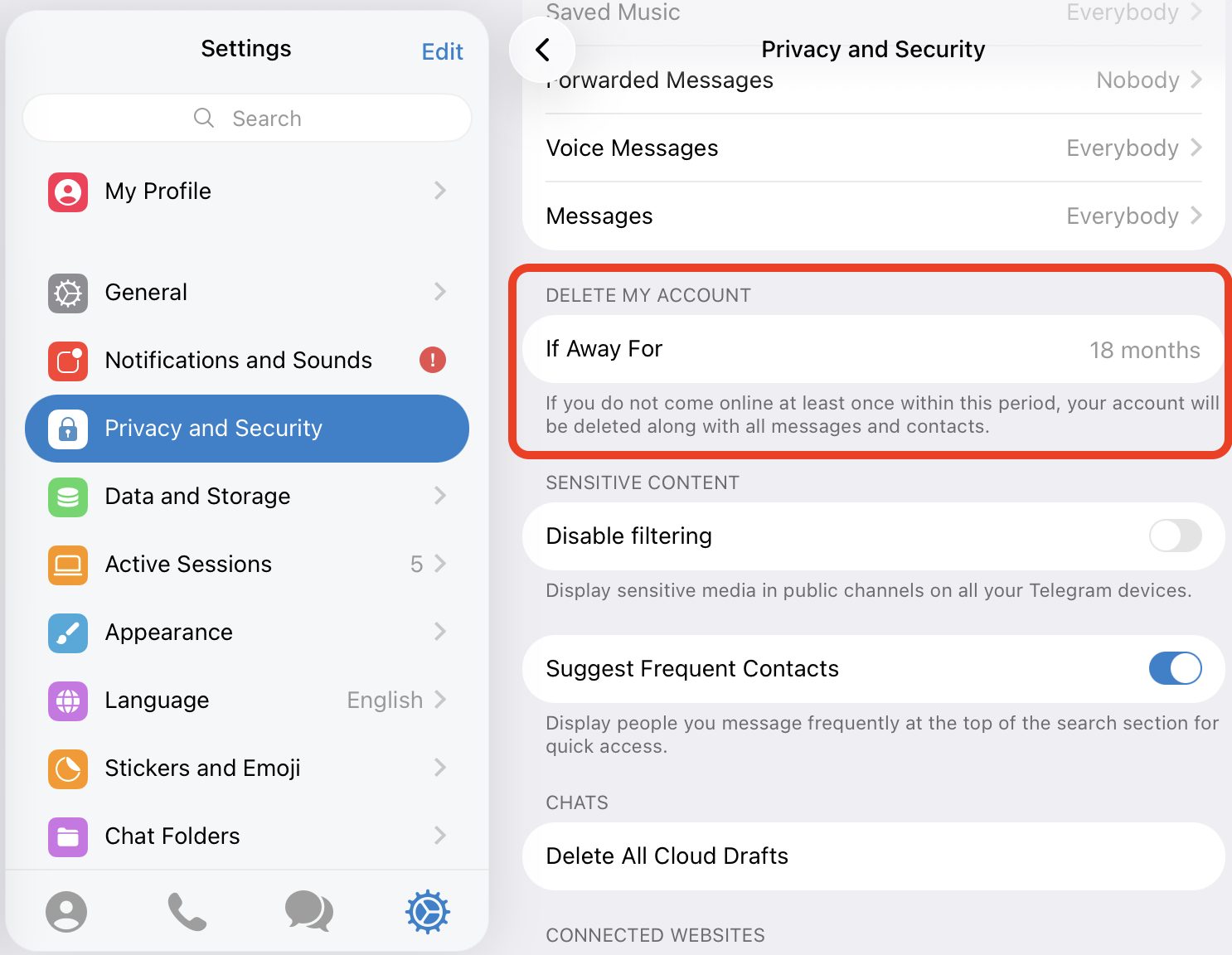
If you'd rather let the app handle things on its own, you can set up Telegram's automatic self-destruct feature right from your phone.
→ Open Telegram on your phone and tap Settings.
→ Go to Settings > Privacy and Security > Delete My Account (or If Away For depending on your phone).
→ Pick your preferred inactivity timer: 1 month, 3 months, 6 months, 12 months, or 18 months.
→ Feel free to log out or uninstall the app. Once your account stays completely quiet for that chosen period, Telegram will automatically clean up your profile, contacts, and cloud chats for you :)
How to Delete Telegram Account Without Code
Ever lost access to your phone or active sessions and found yourself locked out? Happens to the best of us, and there is no need to worry.
If you're wondering how to delete a Telegram account without code, the solution is nice and simple: you just let the self-destruct timer do its thing. Since Telegram uses in-app codes for security, there isn't a direct way to bypass the verification step for instant browser deletion. Simply leave the account inactive, and Telegram will automatically process your account removal once your timer runs out :) For more details, feel free to check out the official Telegram FAQ.
Why Users Are Deleting Telegram: Privacy Concerns
While Telegram has tons of fun features, many privacy-minded folks end up moving to other platforms once they take a closer look at how data is stored.
Unlike some end-to-end encrypted apps like Signal, Telegram's standard cloud chats aren't end-to-end encrypted by default. They are encrypted safely on servers, but Telegram manages the keys. Only Secret Chats offer full end-to-end encryption tied directly to your physical device.

Because storing chat histories on central servers isn't for everyone, users who want maximum control over their privacy often choose to lighten their digital footprint by deleting their accounts and switching to alternative apps like Signal or WhatsApp :)
Use Stands AdBlocker to Enhance Your Post-Telegram Privacy
So now you are probably exploring new messaging options, checking out privacy reviews, and settling into new apps, but online ads and pop-ups can get in the way. I recommend checking Stands AdBlocker and adding it to your browser to keep everything fast, clean, and distraction-free!
- Don't forget it is also really lightweight. Stands was built to run in the background without slowing down your browser.
- Last but not least, the Stands extension works everywhere. It is completely free to use on Google Chrome, Edge, Firefox, Opera, Brave, Vivaldi, and even on Android as a separate browser!
Ready for a seamless web experience?

Download Stands AdBlocker for Free → :)
FAQs
How long does it take to delete a Telegram account?
If you use the official web portal at my.telegram.org, deletion is instantaneous! If you choose the in-app self-destruct setting, it happens automatically after your selected period of inactivity (1, 3, 6, or 12 months) :)
Can I recover my data after deletion?
Unfortunately, no. Deletion permanently clears your cloud chats, media, and contact lists. Be sure to back up anything special before saying goodbye!
Why am I not receiving the Telegram deletion code?
Your confirmation code gets delivered right inside your active Telegram app on your phone or desktop, not via text. SMS is only used as a backup if you don't have any active app sessions running.
Can I use the same phone number to sign up again?
You sure can! Just keep in mind that Telegram usually has a brief cooldown period, so you might need to wait a few days after deleting before creating a fresh account with the same number :)
Why should I use an ad blocker after deleting my Telegram account?
Taking care of your online accounts is a wonderful step toward reclaiming your digital space! Pairing account cleanups with an ad blocker like Stands AdBlocker helps block pesky pop-ups and cookie banners, giving you a much smoother and happier browsing experience as you try out new apps :)

